/ Workato
Data Pipelines
Summary
Workato as an integration platform allows disparate systems to send data to one another in real-time, but had not yet allowed large volumes of data for analysis or storage. Previously, enterprises would use separate platforms for this purpose, such as Fivetran or Informatica.
I joined the data orchestration team to lead the design effort helping bridge the gap between Workato’s ETL & Reverse ETL offering up to par with customer expectations and requirements.
When I joined, another designer had already helped ship a v1 of our data pipelines product, but moved away from it to focus on other things. It was up to me to guide the team through a feature roadmap provided by our PM that aimed to support more sources/destinations, and extending our data replication capabilities.
My role & objective
The core UX was already in place when I began working on data orchestration features. It was my responsibility propose scalable patterns that enable certain features and capabilities while optimizing for engineering effort.
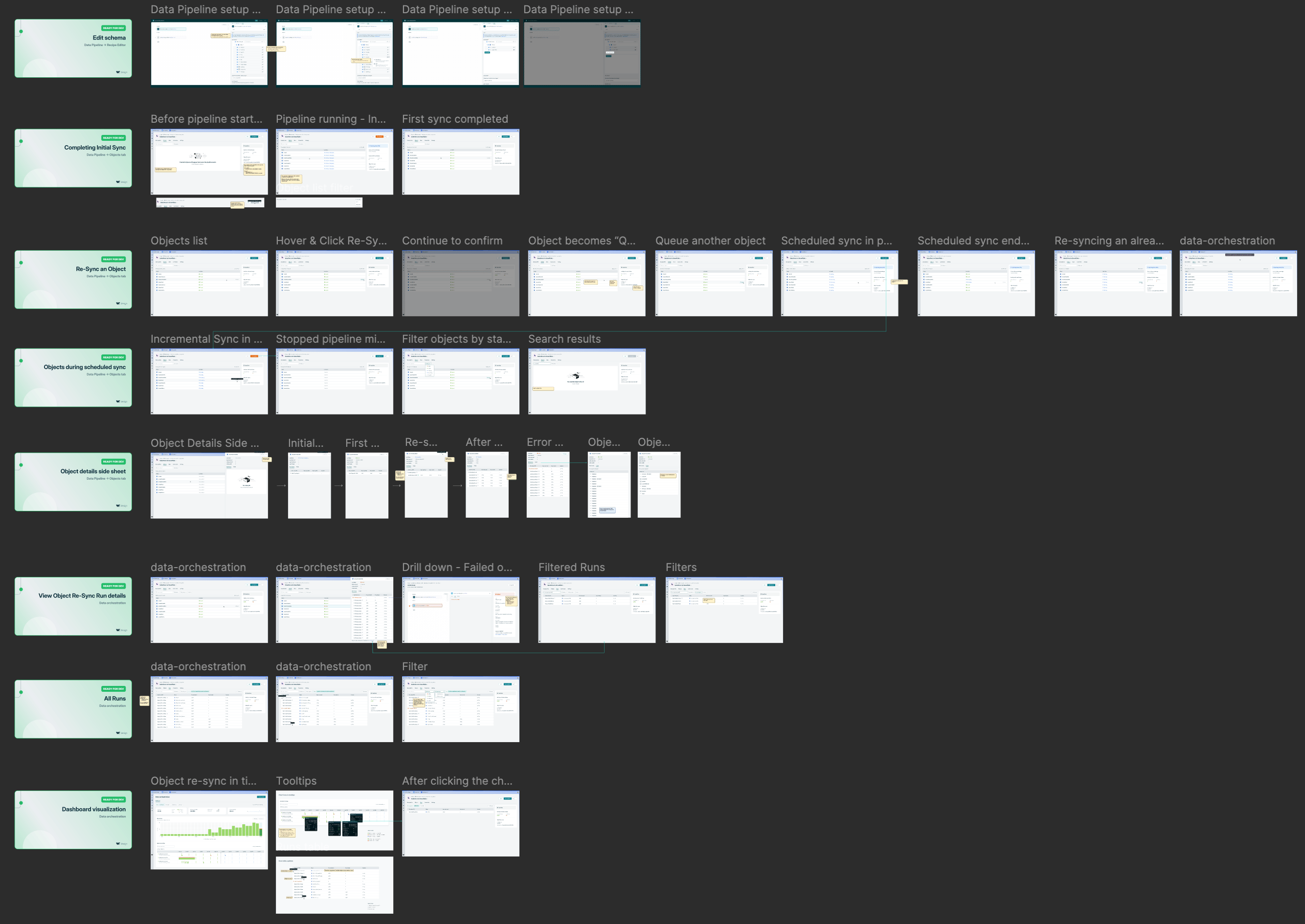
Design handoff for “Object re-syncs” feature
In my experience working with data pipelines UX, we are usually helping users perform 1 of 4 jobs: Schema or settings configuration, testing new configurations, monitoring sync health, or investigating/debugging an error. Some of the solutions became concrete quickly, while others presented some unknowns to resolve.
Hashing schema fields
The core UX was already in place when I began working on data orchestration features. It was my responsibility propose scalable patterns that enable certain features and capabilities while optimizing for engineering effort.
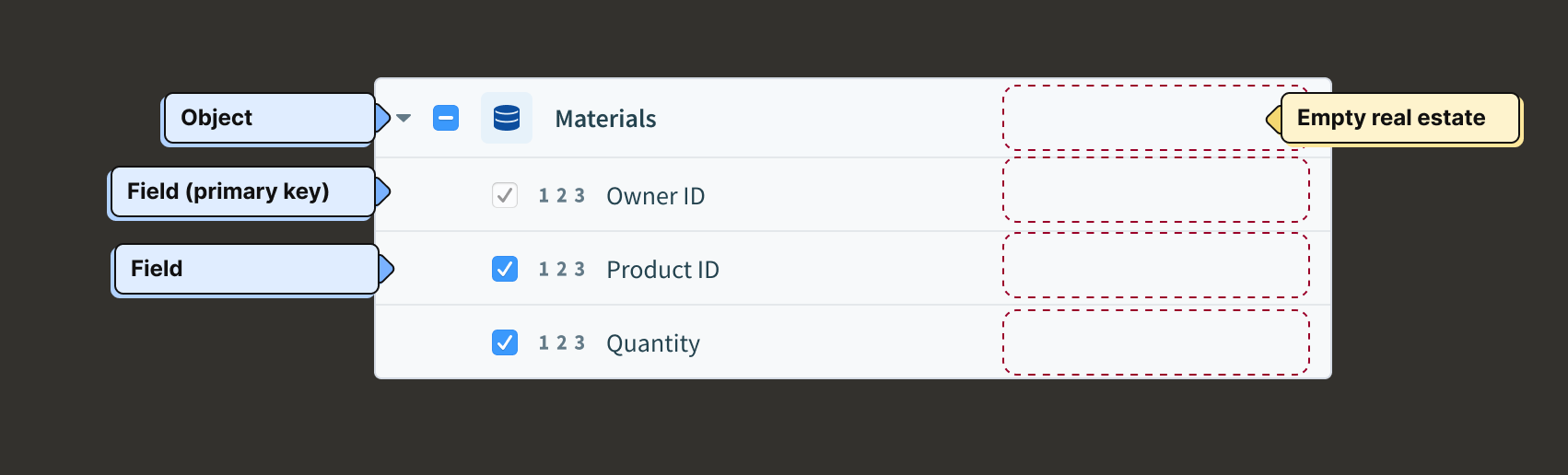
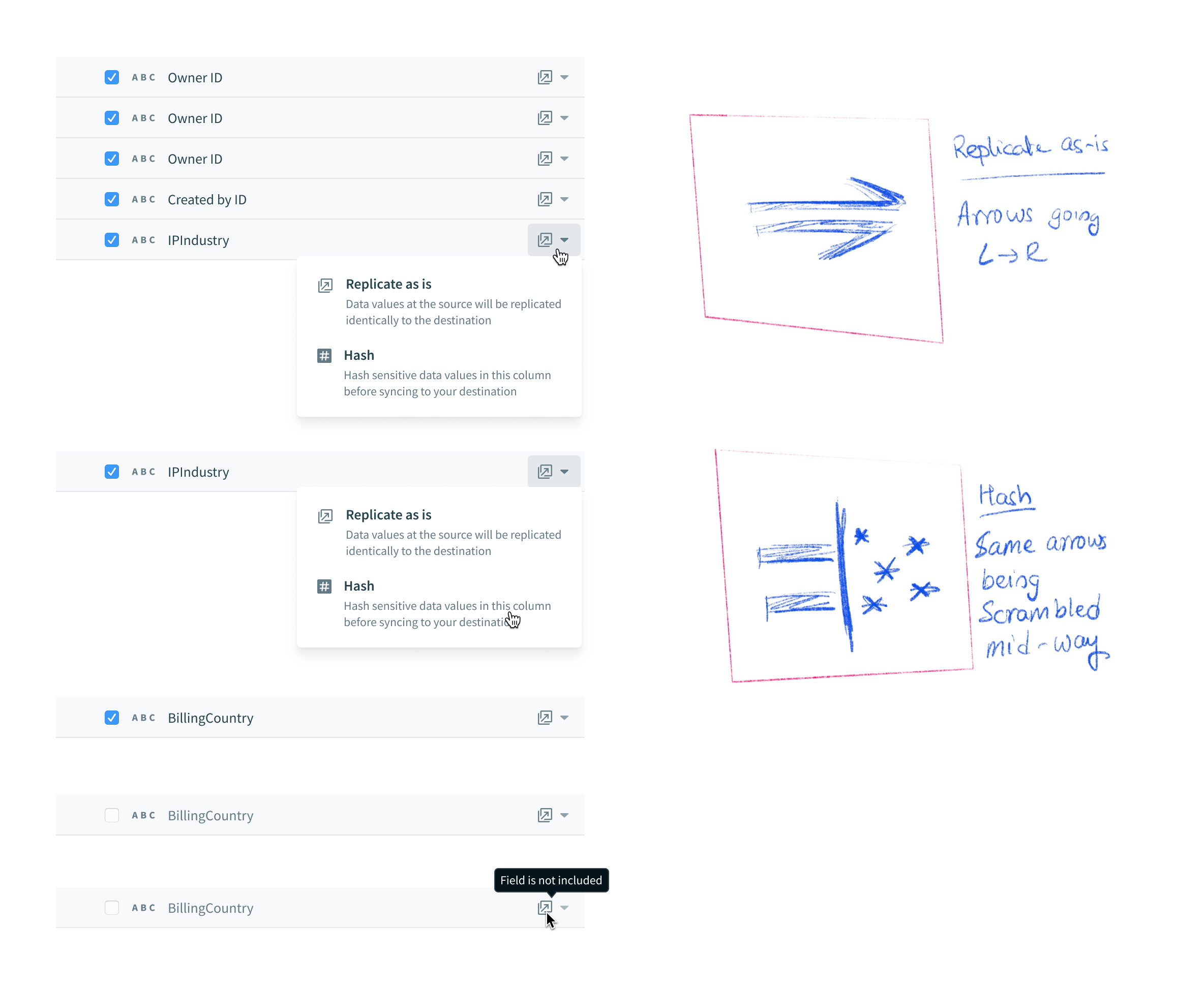
Users need to be able to protect sensitive (PII) information before it gets replicated. The PM and I brainstormed the copy for this field-level configuration that allows users to decide whether or not to hash a field or “replicate as is”. I decided to explore a range of options for the “Hash” icon, so that it fits systemically with the surrounding copy, and is easily understood without copy as well.

Object re-syncs
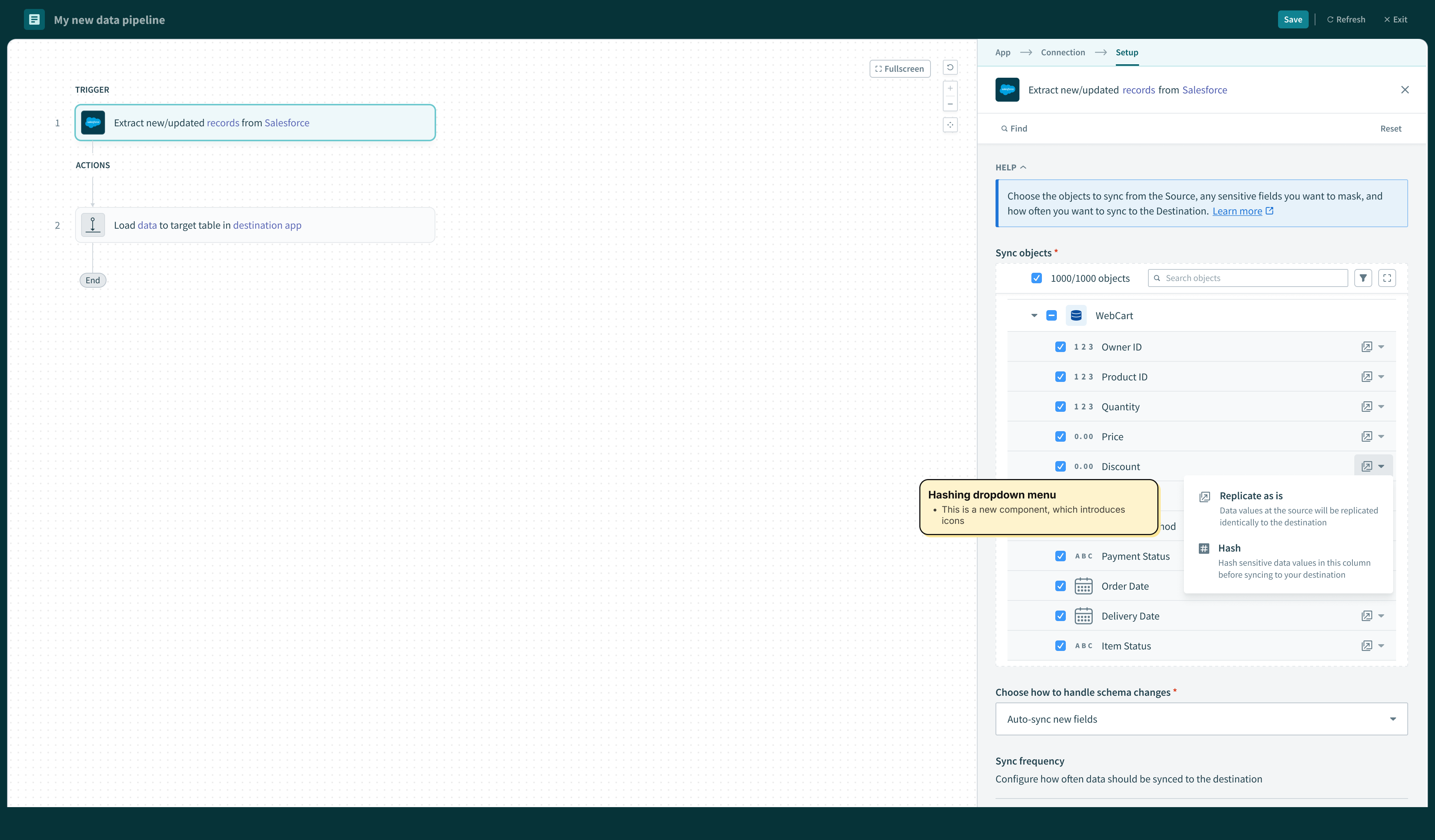
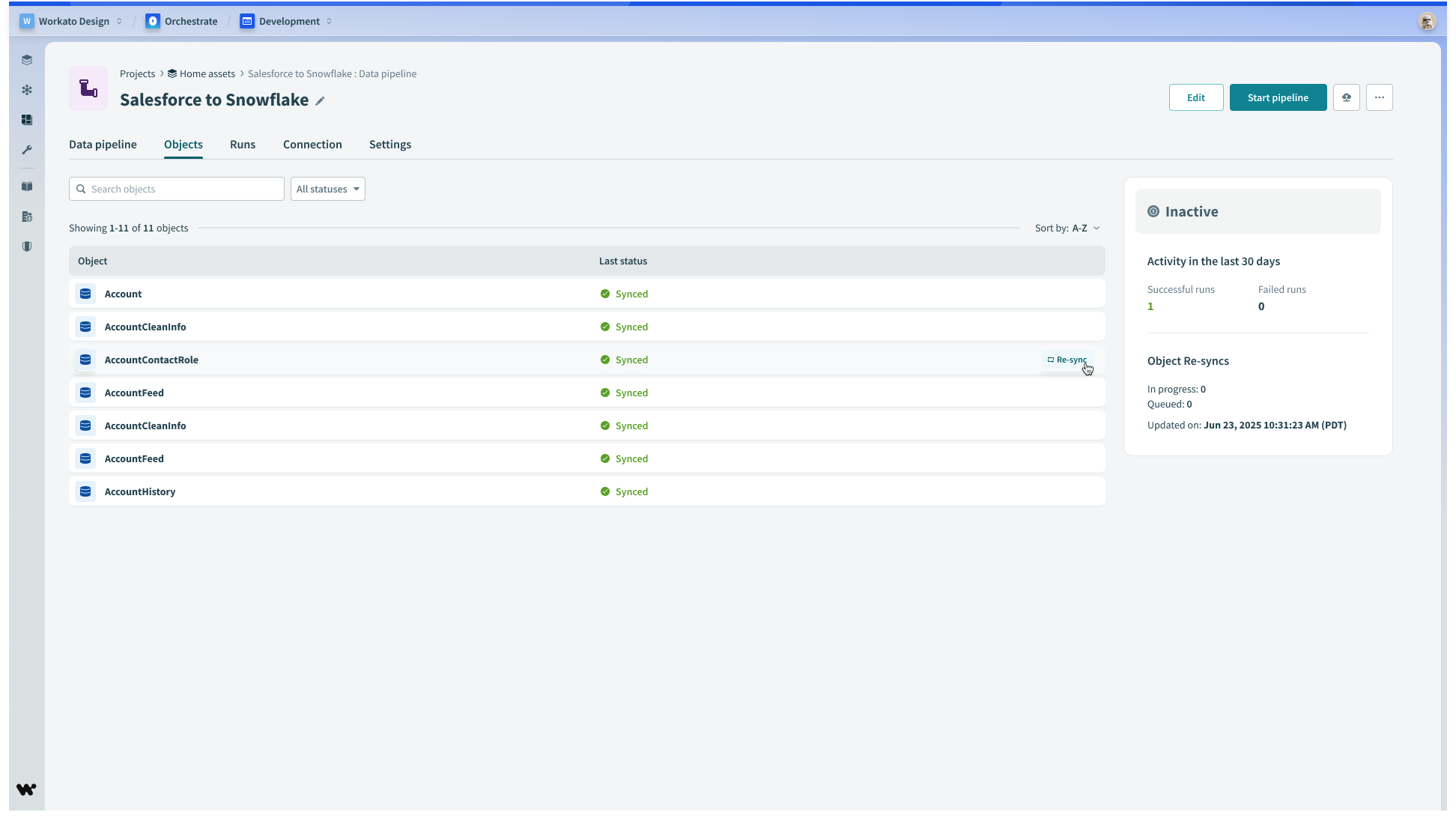
Users need to ability to manually trigger a one-time sync on individual objects. This gives user control over data movement outside of the regular sync schedule.
Object sync settings
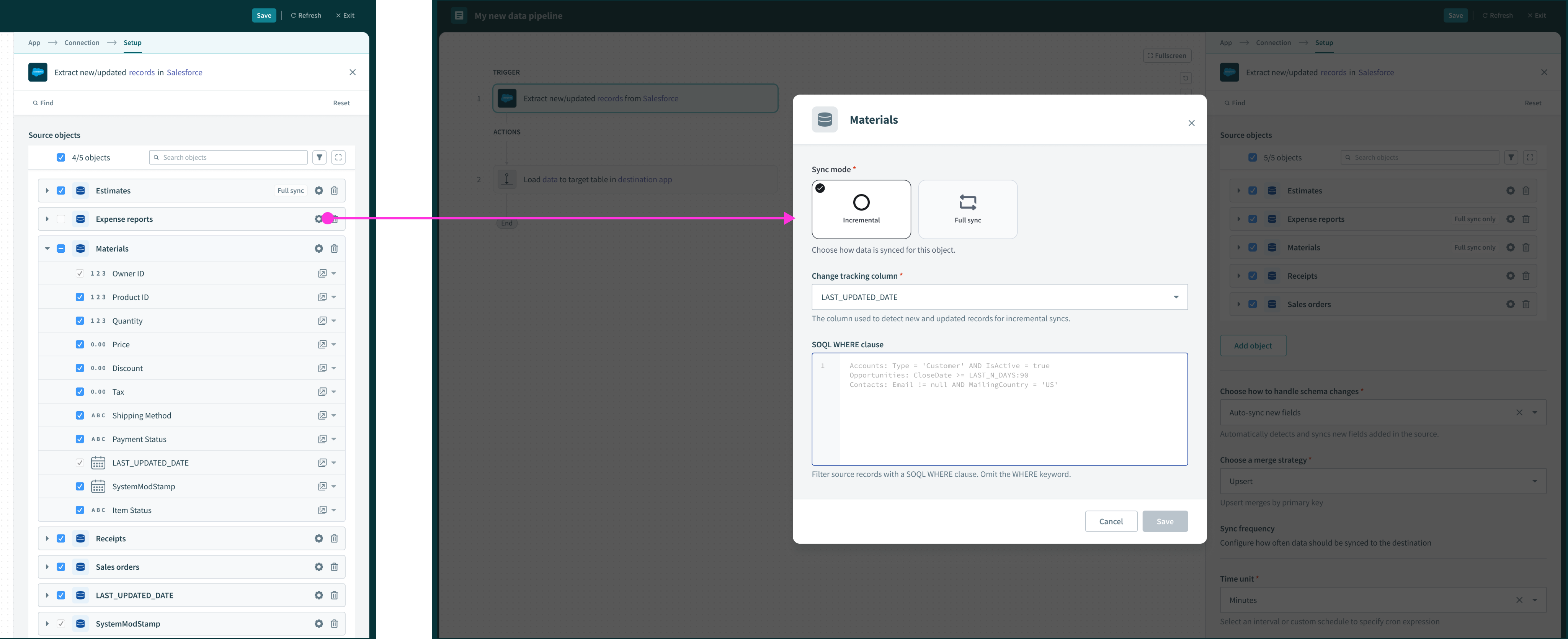
We introduced affordances in the right margin of field rows to support hashing. Here we extended that pattern to include a way to configure object-level settings.
Monitoring
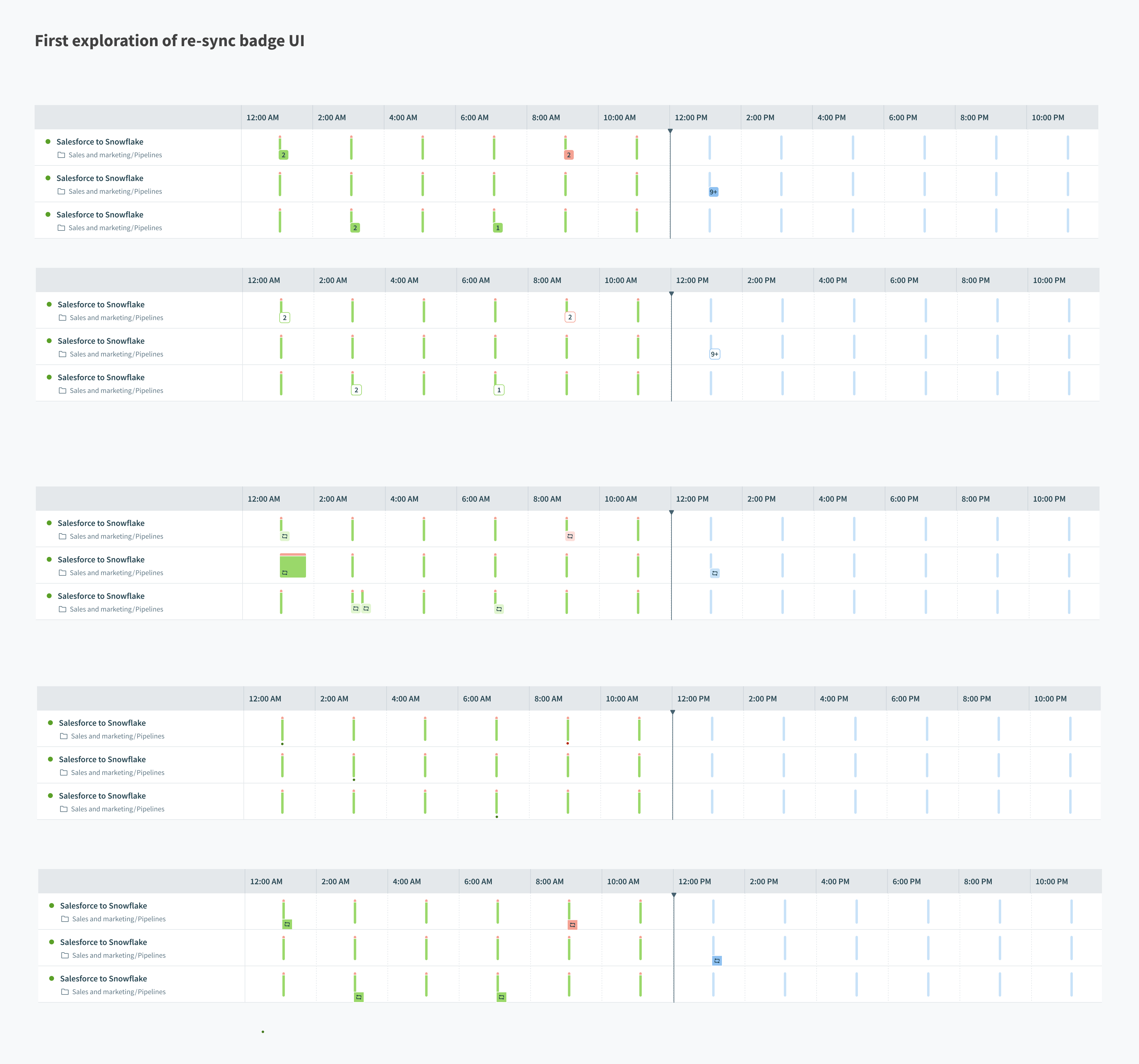
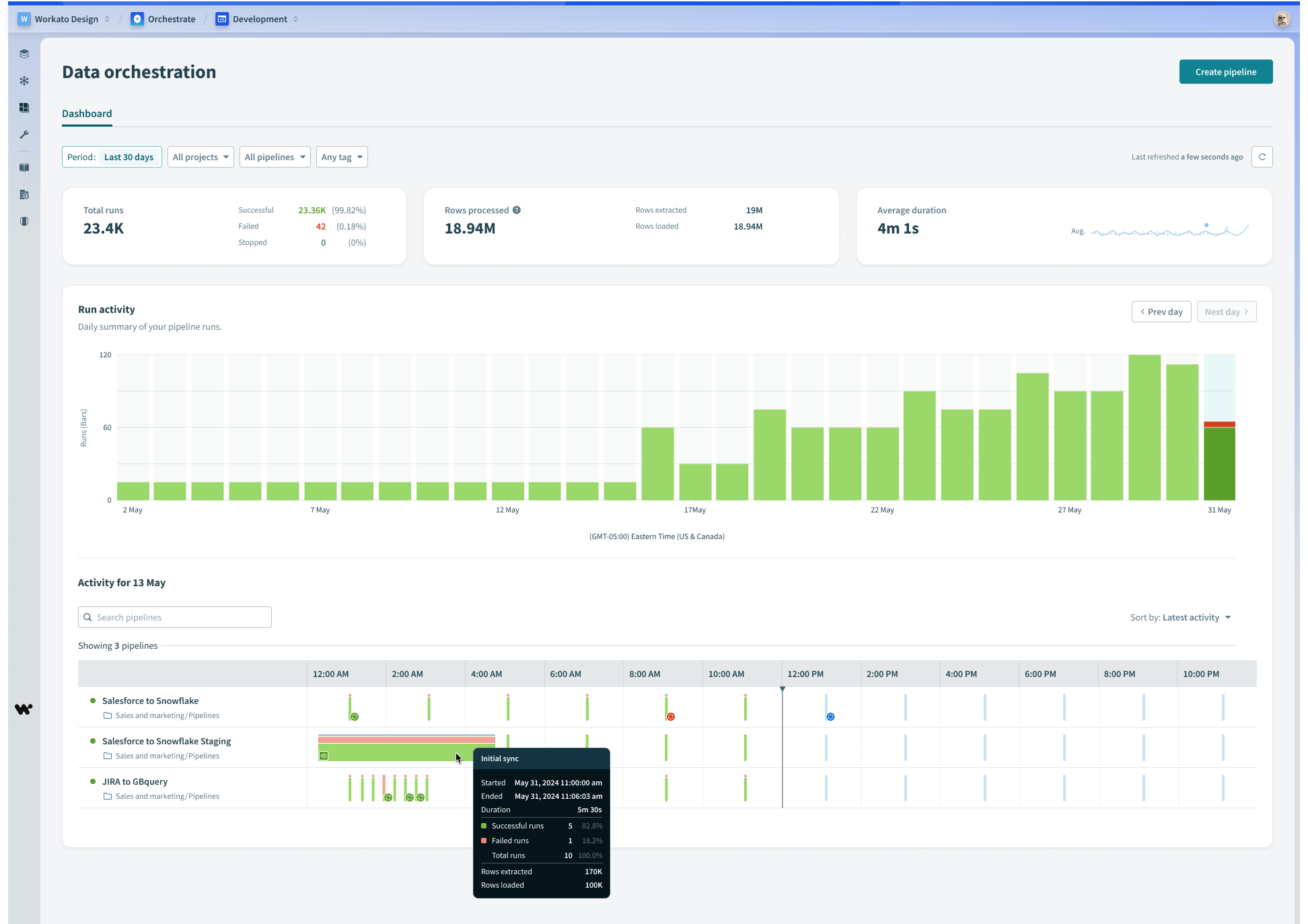
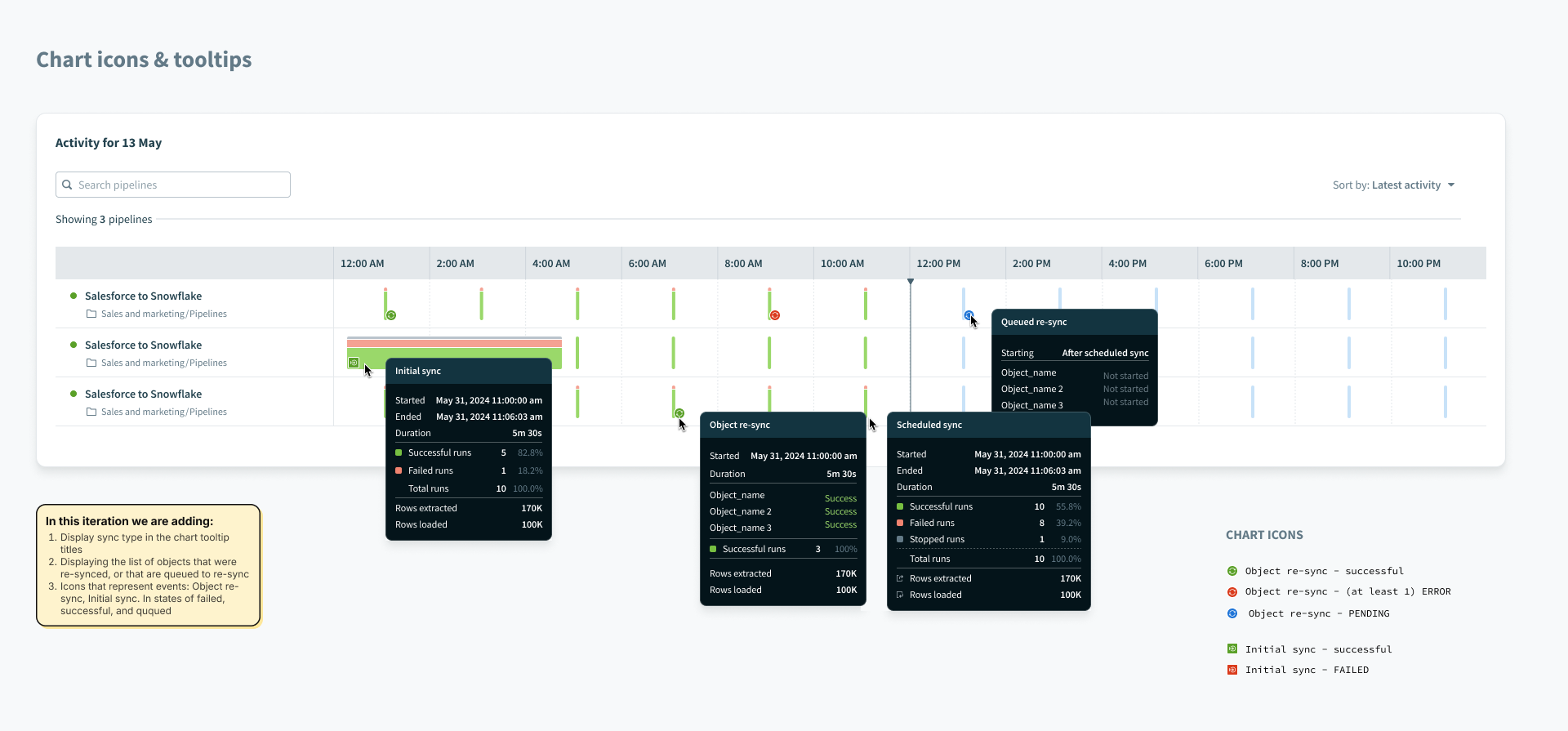
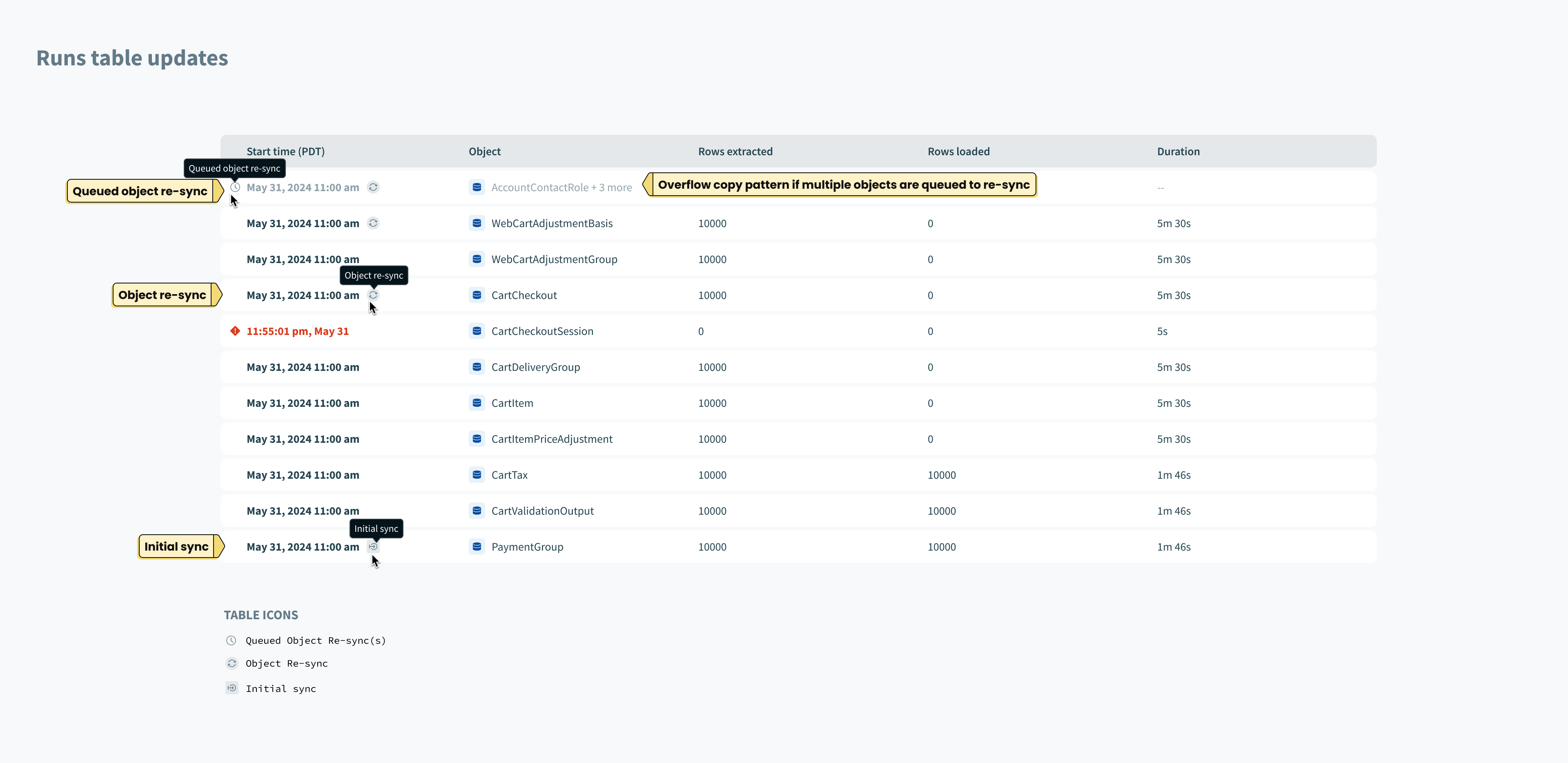
By introducing object re-syncs, we now had 3 types of syncs possible: Object Re-sync (previously called a “full sync”), Initial sync, and incremental syncs. In order to help users understand which type of sync is which, from the monitoring dashboard, we added new indicator icons in the chart views and tooltips.
Components
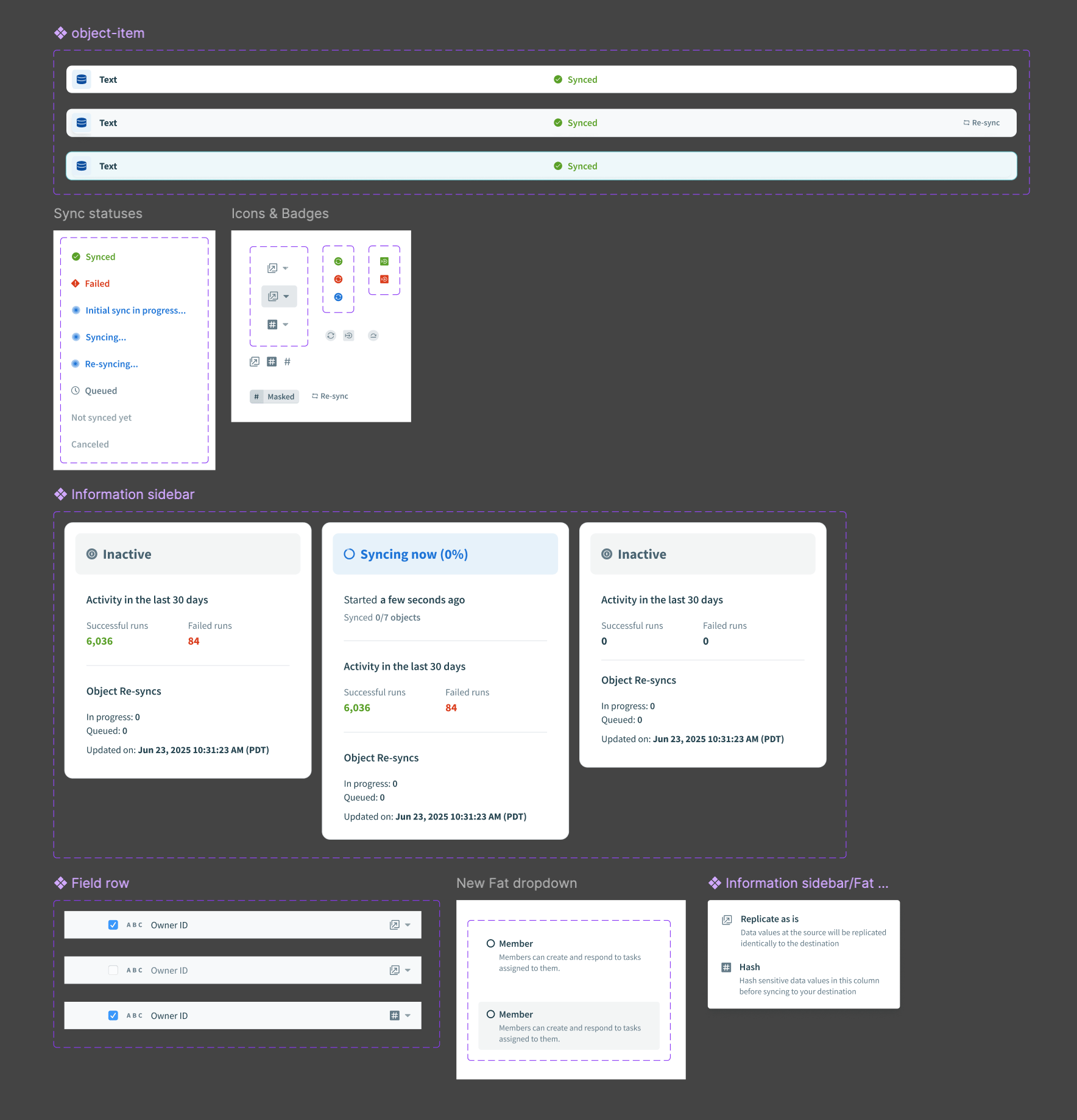
We added components and patterns to support these releases as a whole.
Components
Wrap up
There were other features I worked on that were built on top of these patterns. I learned the importance of respecting prior work while enabling future iterations without introducing major unexpected changes for users.
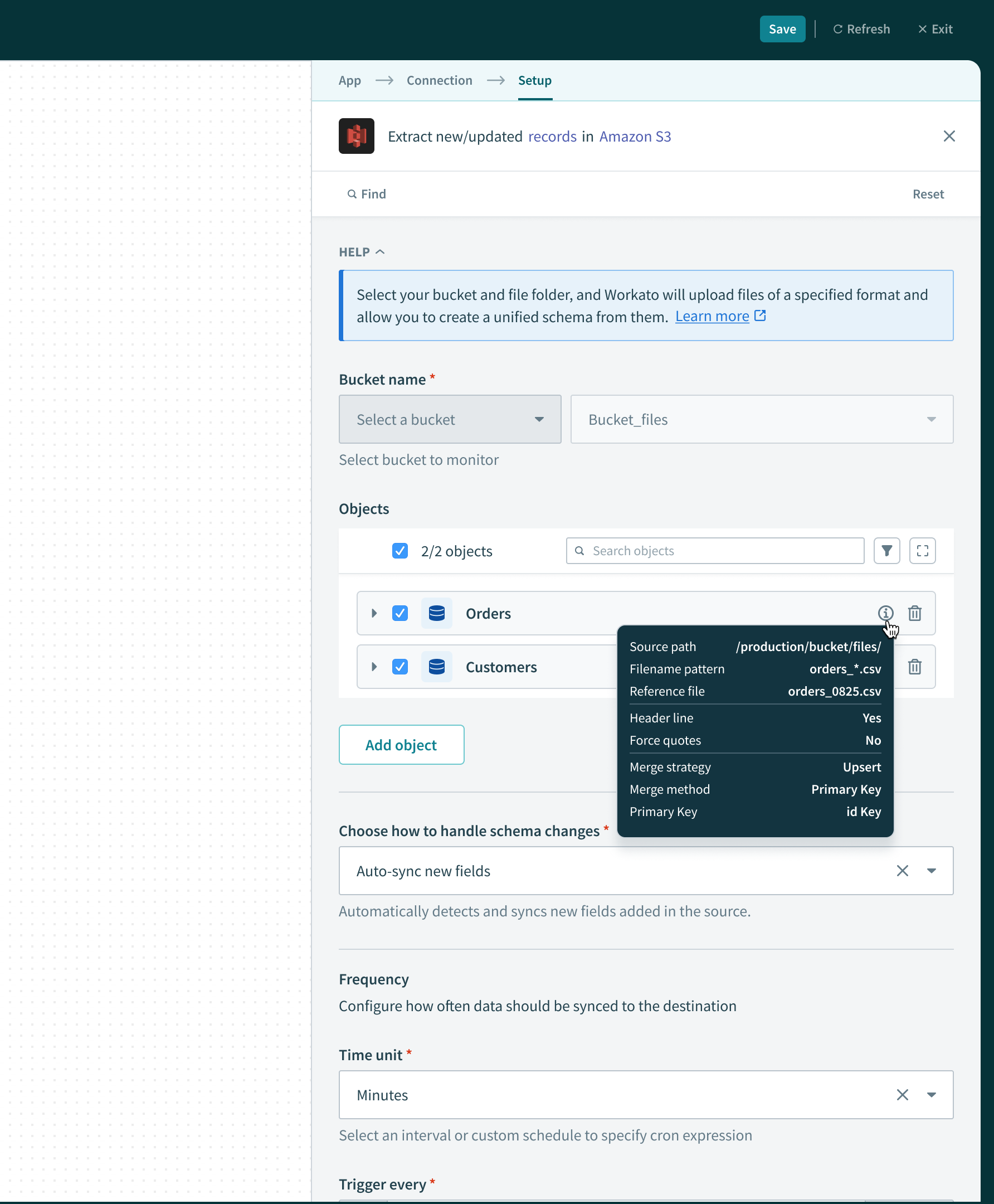
This was a subsequent feature for data pipelines of type “File Connector” which requires more metadata for users to reference. We needed a place to surface it, and the icon+tooltip worked well, extending the existing pattern.
/ Workato
Data Pipelines
Summary
Workato as an integration platform allows disparate systems to send data to one another in real-time, but had not yet allowed large volumes of data for analysis or storage. Previously, enterprises would use separate platforms for this purpose, such as Fivetran or Informatica.
I joined the data orchestration team to lead the design effort helping bridge the gap between Workato’s ETL & Reverse ETL offering up to par with customer expectations and requirements.
When I joined, another designer had already helped ship a v1 of our data pipelines product, but moved away from it to focus on other things. It was up to me to guide the team through a feature roadmap provided by our PM that aimed to support more sources/destinations, and extending our data replication capabilities.
My role & objective
The core UX was already in place when I began working on data orchestration features. It was my responsibility propose scalable patterns that enable certain features and capabilities while optimizing for engineering effort.
Design handoff for “Object re-syncs” feature
Hashing schema fields
The core UX was already in place when I began working on data orchestration features. It was my responsibility propose scalable patterns that enable certain features and capabilities while optimizing for engineering effort.
Users need to be able to protect sensitive (PII) information before it gets replicated. The PM and I brainstormed the copy for this field-level configuration that allows users to decide whether or not to hash a field or “replicate as is”. I decided to explore a range of options for the “Hash” icon, so that it fits systemically with the surrounding copy, and is easily understood without copy as well.
In my experience working with data pipelines UX, we are usually helping users perform 1 of 4 jobs: Schema or settings configuration, testing new configurations, monitoring sync health, or investigating/debugging an error. Some of the solutions became concrete quickly, while others presented some unknowns to resolve.
Object re-syncs
Users need to ability to manually trigger a one-time sync on individual objects. This gives user control over data movement outside of the regular sync schedule.
Object sync settings
We introduced affordances in the right margin of field rows to support hashing. Here we extended that pattern to include a way to configure object-level settings.
Monitoring
By introducing object re-syncs, we now had 3 types of syncs possible: Object Re-sync (previously called a “full sync”), Initial sync, and incremental syncs. In order to help users understand which type of sync is which, from the monitoring dashboard, we added new indicator icons in the chart views and tooltips.
Components
We added components and patterns to support these releases as a whole.
Components
Wrap up
There were other features I worked on that were built on top of these patterns. I learned the importance of respecting prior work while enabling future iterations without introducing major unexpected changes for users.
This was a subsequent feature for data pipelines of type “File Connector” which requires more metadata for users to reference. We needed a place to surface it, and the icon+tooltip worked well, extending the existing pattern.
/ Workato
Data Pipelines
Summary
Workato as an integration platform allows disparate systems to send data to one another in real-time, but had not yet allowed large volumes of data for analysis or storage. Previously, enterprises would use separate platforms for this purpose, such as Fivetran or Informatica.
I joined the data orchestration team to lead the design effort helping bridge the gap between Workato’s ETL & Reverse ETL offering up to par with customer expectations and requirements.
My role & objective
The core UX was already in place when I began working on data orchestration features. It was my responsibility propose scalable patterns that enable certain features and capabilities while optimizing for engineering effort.
Design handoff for “Object re-syncs” feature
In my experience working with data pipelines UX, we are usually helping users perform 1 of 4 jobs: Schema or settings configuration, testing new configurations, monitoring sync health, or investigating/debugging an error. Some of the solutions became concrete quickly, while others presented some unknowns to resolve.
Hashing schema fields
The core UX was already in place when I began working on data orchestration features. It was my responsibility propose scalable patterns that enable certain features and capabilities while optimizing for engineering effort.
Users need to be able to protect sensitive (PII) information before it gets replicated. The PM and I brainstormed the copy for this field-level configuration that allows users to decide whether or not to hash a field or “replicate as is”. I decided to explore a range of options for the “Hash” icon, so that it fits systemically with the surrounding copy, and is easily understood without copy as well.
Object re-syncs
Users need to ability to manually trigger a one-time sync on individual objects. This gives user control over data movement outside of the regular sync schedule.
Object sync settings
We introduced affordances in the right margin of field rows to support hashing. Here we extended that pattern to include a way to configure object-level settings.
Monitoring
By introducing object re-syncs, we now had 3 types of syncs possible: Object Re-sync (previously called a “full sync”), Initial sync, and incremental syncs. In order to help users understand which type of sync is which, from the monitoring dashboard, we added new indicator icons in the chart views and tooltips.
Components
We added components and patterns to support these releases as a whole.
Components
Wrap up
There were other features I worked on that were built on top of these patterns. I learned the importance of respecting prior work while enabling future iterations without introducing major unexpected changes for users.
This was a subsequent feature for data pipelines of type “File Connector” which requires more metadata for users to reference. We needed a place to surface it, and the icon+tooltip worked well, extending the existing pattern.