/ Workato
Enterprise MCP Servers
Summary
Creating configuration workflows that enable powerful yet secure agentic interfaces for teams requires engineering involvement, limiting adoption and slow experimentation. The MCP server initiative aimed to close this gap by enabling non-technical knowledge workers to create no-code functional, trustworthy servers directly within Workato and without technical support.
My role was to lead research and design for this initiative: Validating usability, defining the MCP server creation flow, and delivering a composable “MCP-creation-as-a-service” type of user experience. This case study walks through how we uncovered pain points, validated opportunities and designed a human-centered flow that bridges technical capability with users.
Our team consisted of a Product Manager, 3-4 Engineers, Designer (me) and 4 pilot customers from our partnership program.
Claude’s client interface along with other compatible clients like Cursor enables users to access any API function by connecting to MCP servers
Problem definition
Hypothesis: There exists a large gap between knowledge workers, who truly understand the problems facing business teams, and technical workers (developers) who can implement the solution in a secure and compliant way. This is evident from the lack of enterprise-grade MCP creation and publishing products available today.
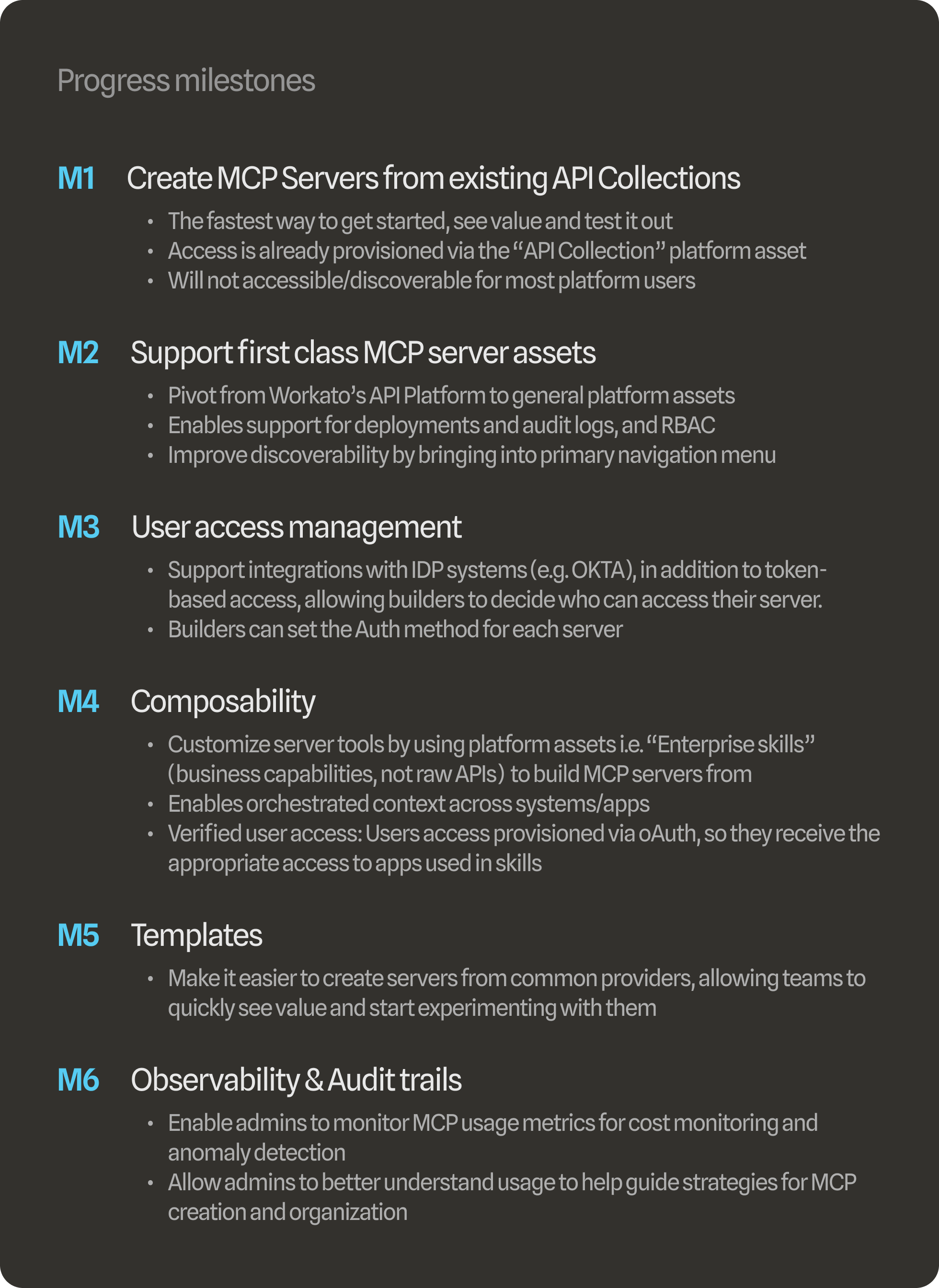
Scope: We have to break up our efforts into progress milestones that allows us to validate ideas, learn and fix things as we go, without introducing risks or unwanted customer outcomes.
Market opportunity: There are a range of MCP catalogs out there that allow users to install pre-defined MCP servers from common providers, but they all lack the capability of personalizing and customing the server to fit specific problems and business logic. Our “Composable MCP” that uses existing platform assets (e.g. “Skill Recipes”) and integrates with existing Identity Providers (e.g. OKTA) for the enterprise bridges that gap.
Starting scope small to build momentum
To generate traction, our PM and I broke down the north star into smaller verifiable milestones and connected the vision back to customer requirements. Prioritization played a key role in this approach. We divided the vision into several milestones, giving precedence to initiatives with manageable scope but high impact. We recognized that we couldn’t immediately solve all the problems at once -- but we could get things moving with the resources we had.
Core workflows
We identified 2 primary personas we need to serve for this project. Using precedent and existing patterns from companies like Anthropic and OpenAI, we know that “builders” need to create MCP servers and provision access, while “end users” need to install the MCP servers and prompt them in their client apps.


Building (with validation)
The Workato design system provided a solid foundation to begin exploring designs. Below are some solution artifacts from each milestone that was shipped. In some cases we allowed for requirements to be fluid across milestones to accommodate engineering planning.
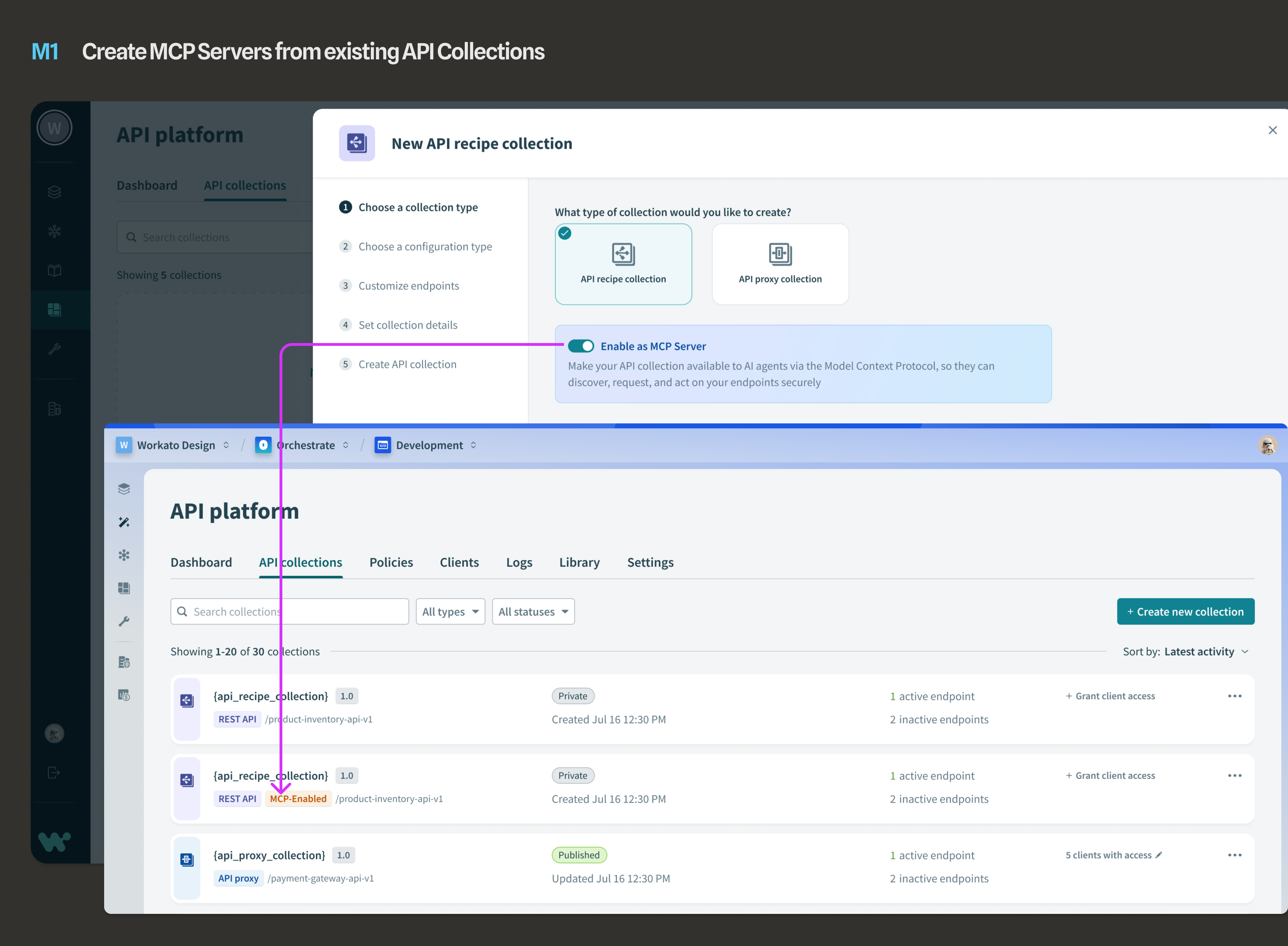
MILESTONE 1: Initially, we built on top of the API platform product, merely adding a toggle allowing users to create MCP servers from API collections that were already built on the platform from API endpoint recipes.
Key Interaction
After allowing builders to turn API collections into MCP servers, we added the URL that end users would need to install the MCP server in Claude or another client app.
Because this was only accessible to Workato platform users who have been provisioned to access the API Platform, not many people could discover it. It was clear we needed to make MCP servers more discoverable, and accessible.
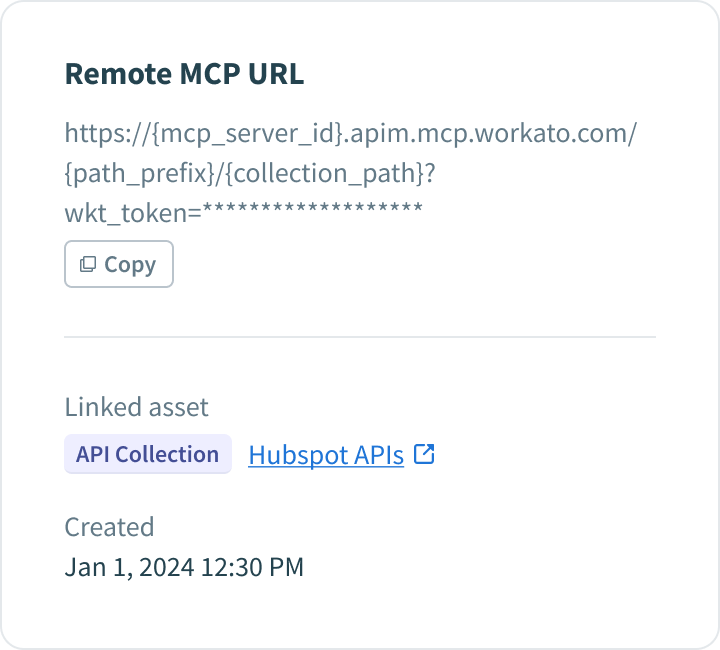
After allowing builders to turn API collections into MCP servers, we added the URL that end users would need to install the MCP server in Claude or another client app.
Because this was only accessible to Workato platform users who have been provisioned to access the API Platform, not many people could discover it. It was clear we needed to make MCP servers more discoverable, and accessible.
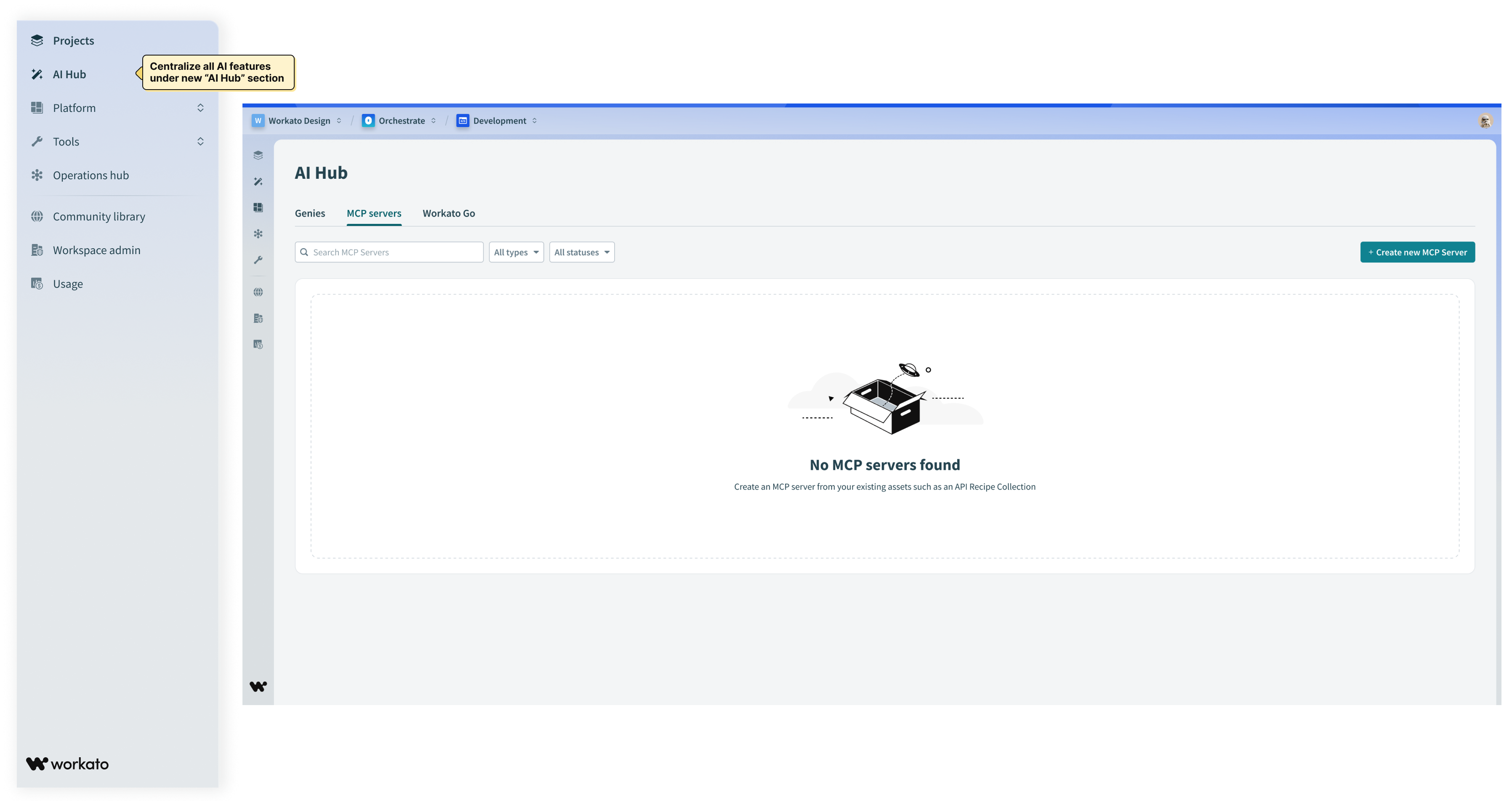
MILESTONE 2: To improve discoverability and bring MCPs into the main navigation menu, we centralized all AI capabilities within a new top-level section called “AI Hub.”
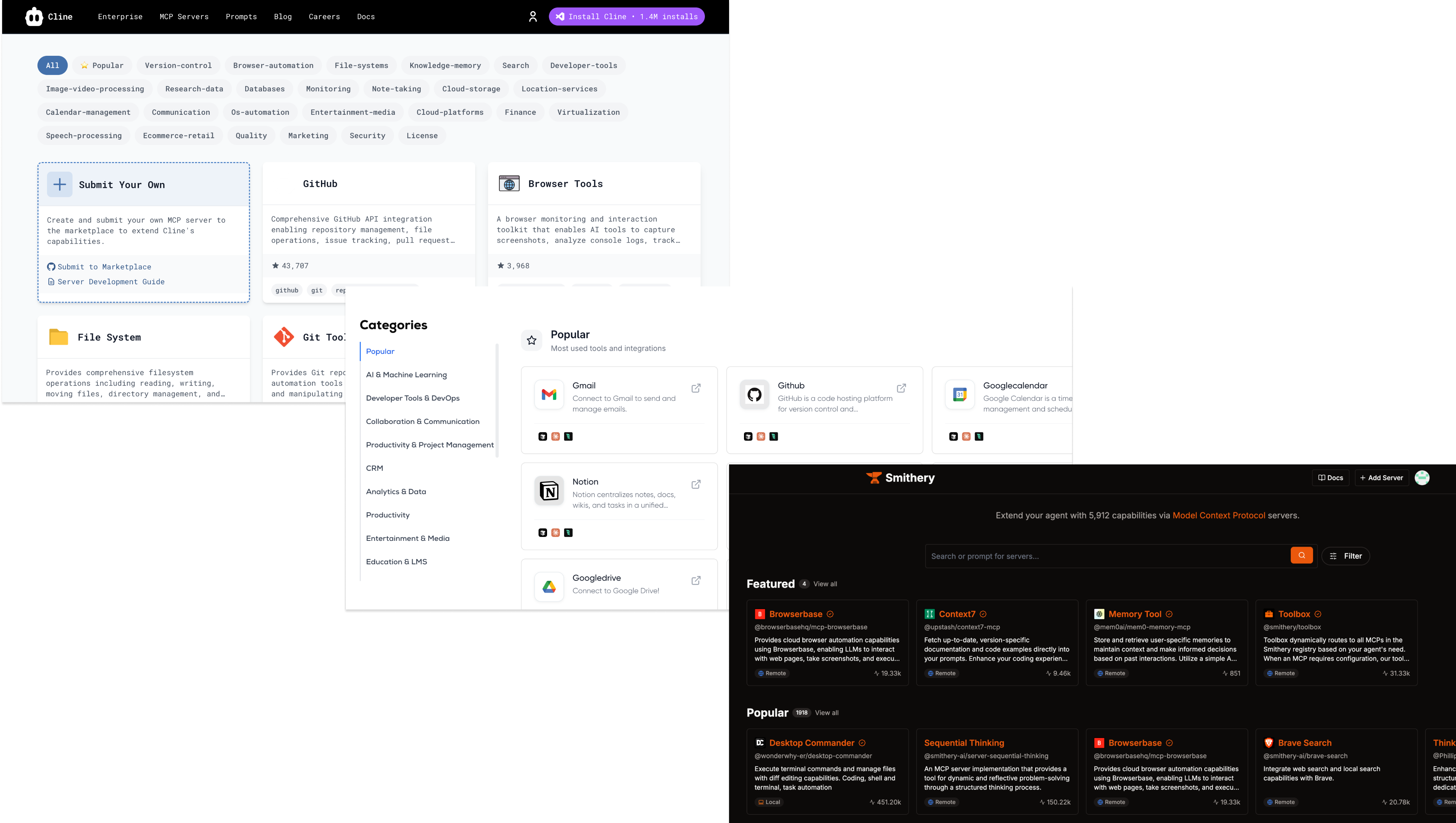
Since MCP as a protocol is not native to Workato, we leaned on some existing MCP server UI patterns to inform our design direction.
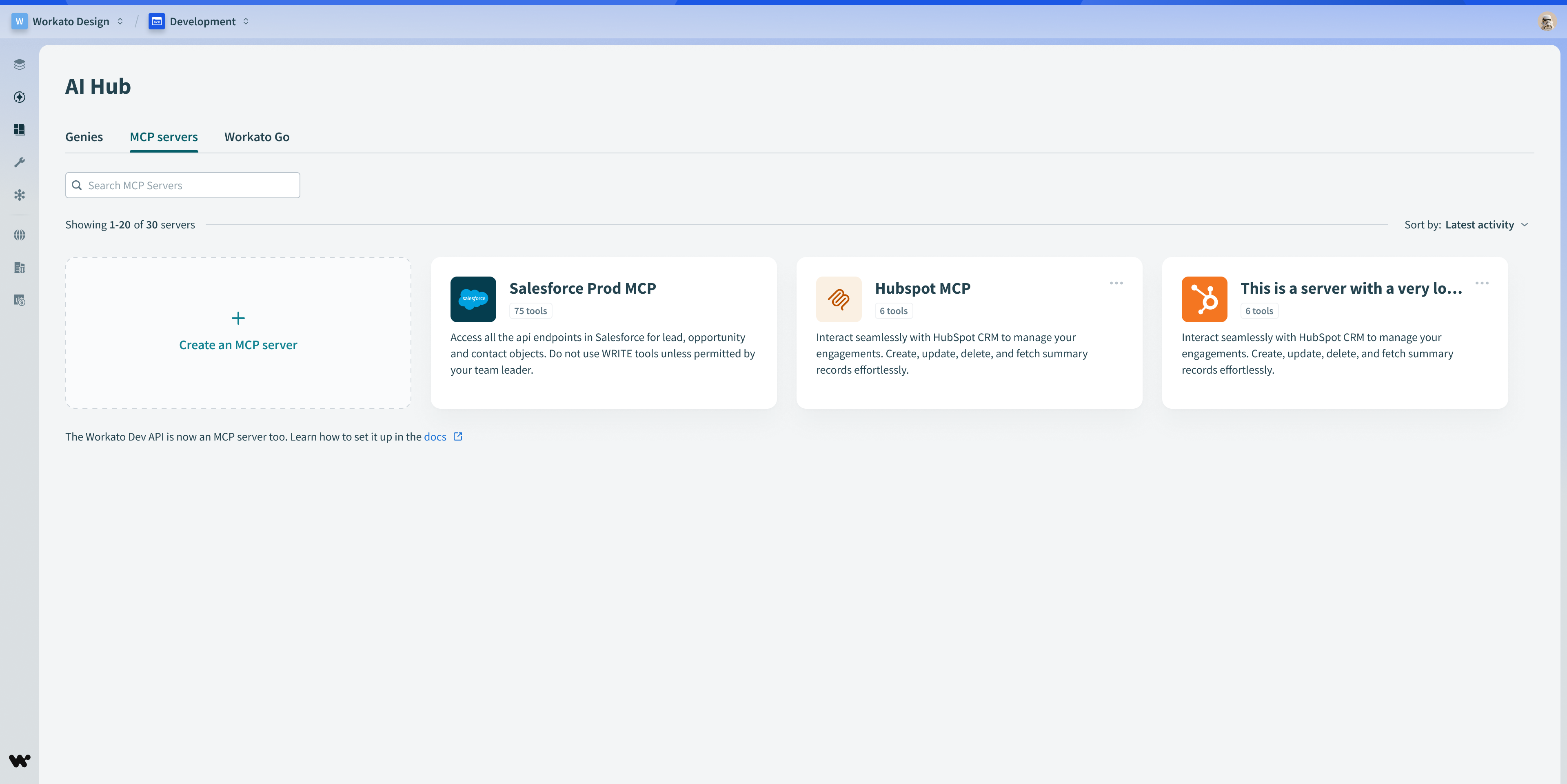
The Landing page state for MCP servers within the AI Hub.
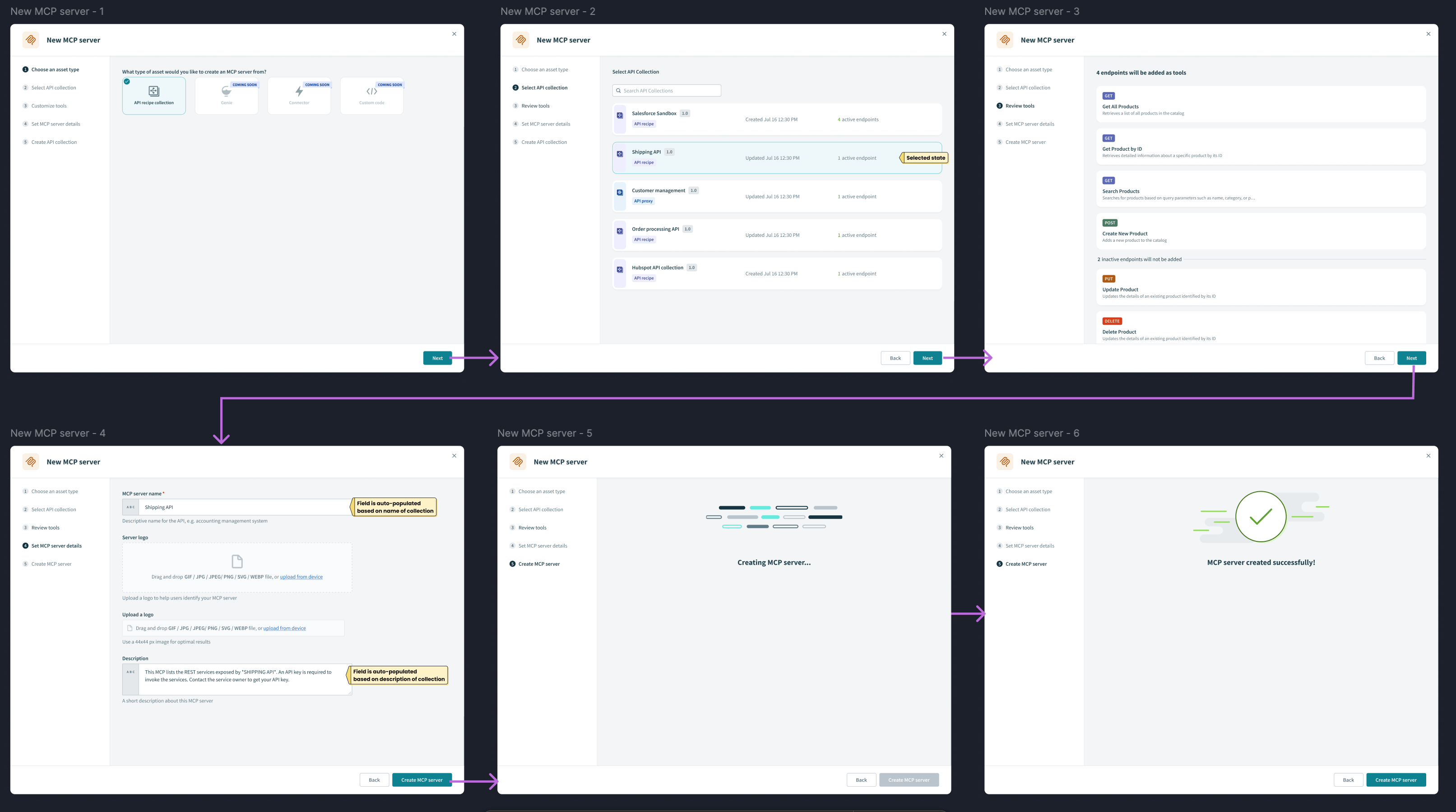
MCP creation wizard design using existing wizard components
We were getting feedback from customers that “AI Hub” was ambiguous and they were hesitant to click it.
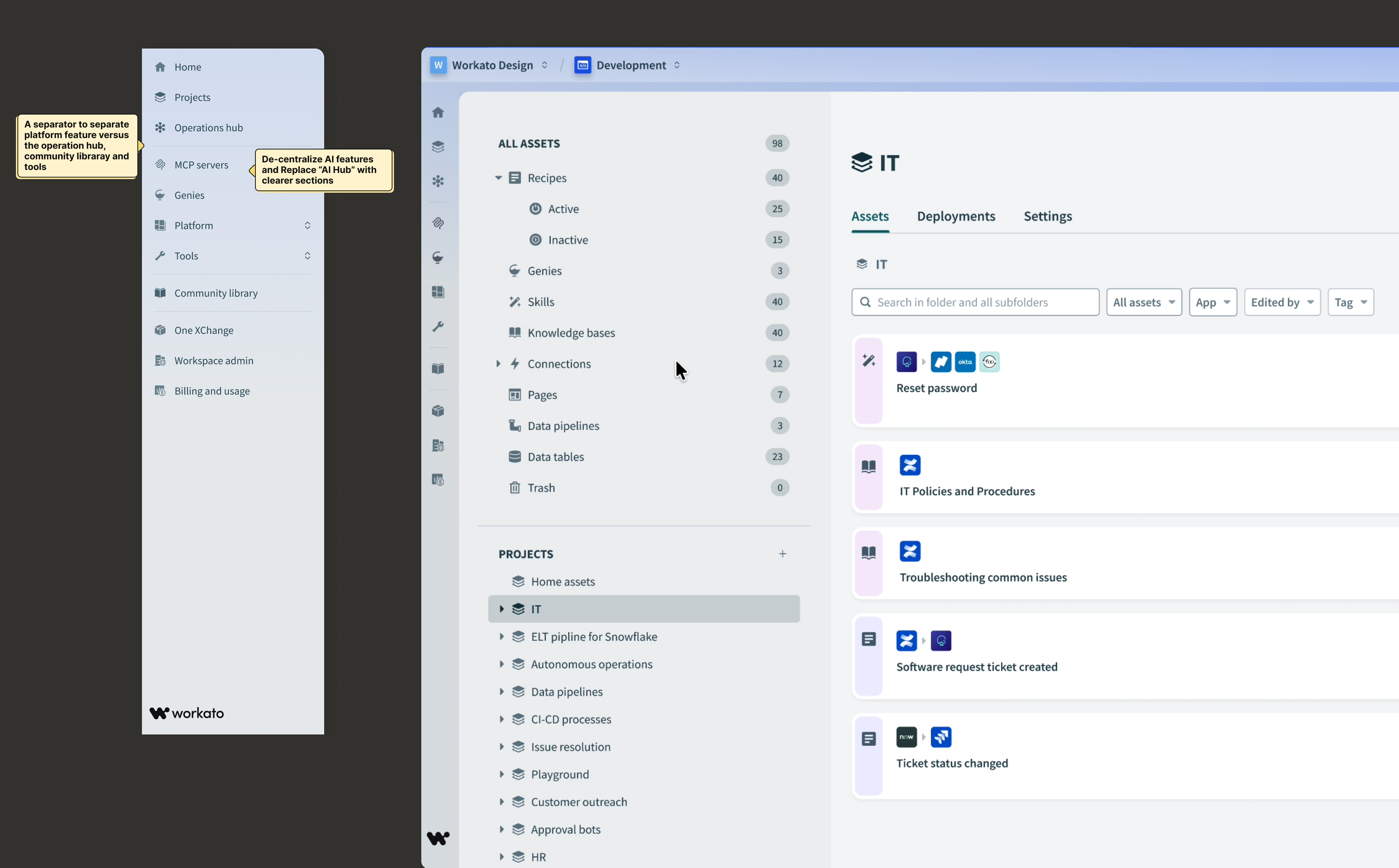
MILESTONE 2: Final navigation menu design. We considered a range of options before landing on this.
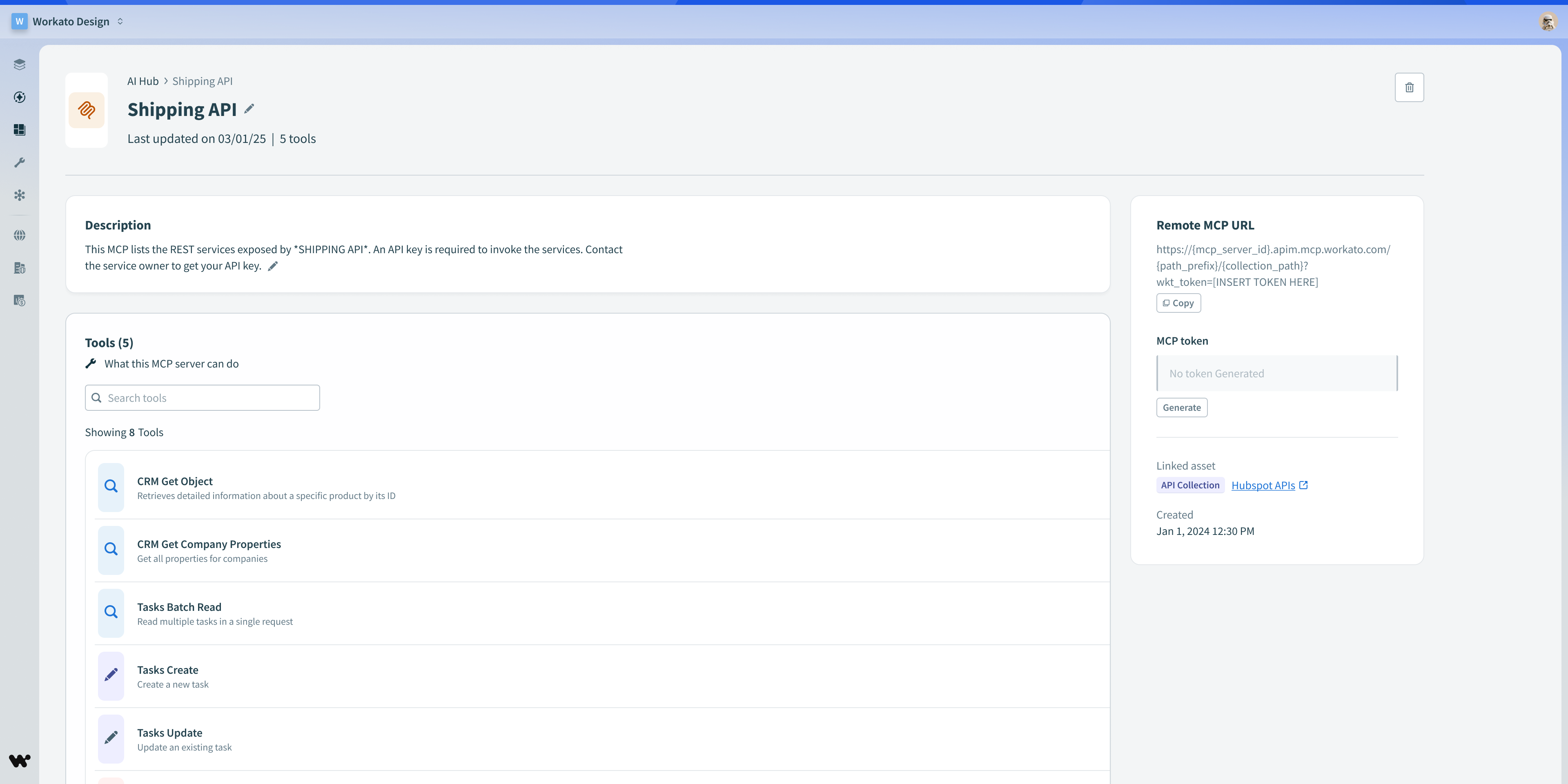
Initial release for the MCPs server detail page
Builders and IT admins need to ensure the right people can access each MCP server. They also need to ensure that people with access receive the correct permissions to application systems that MCP servers connect them to. I worked with the PM to prioritize greater controls over these things.
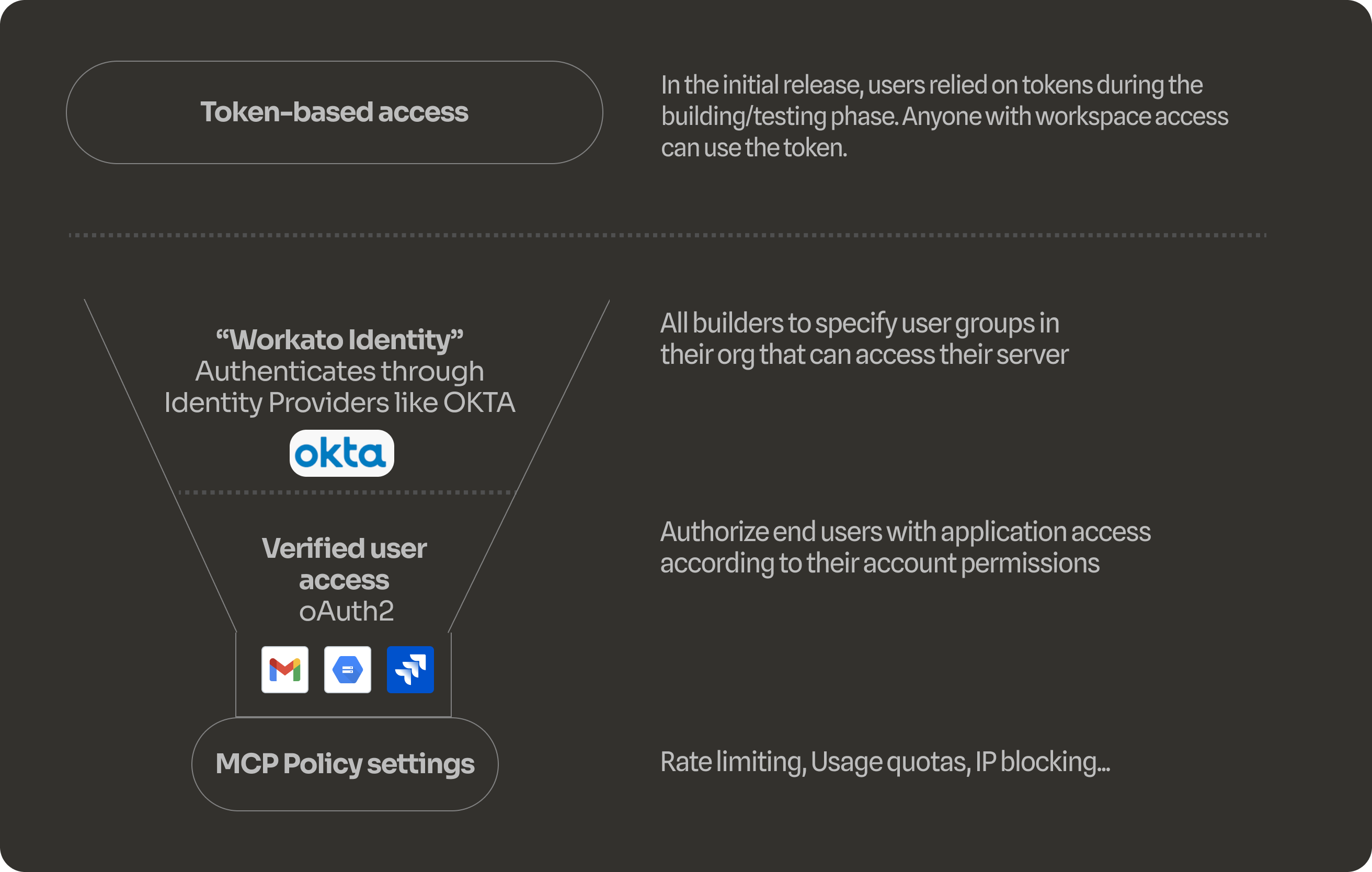
We decided to default each new MCP server to the “Workato Identity” auth method if that was already enabled in the workspace. It allows builders to define which user groups can access a parctiular MCP server. This has many advantages over relying on token sharing which is prone to overuse and requires more technical setup.
MILESTONE 3: Adding the “Settings” section where users can switch the authentication method for an MCP server.
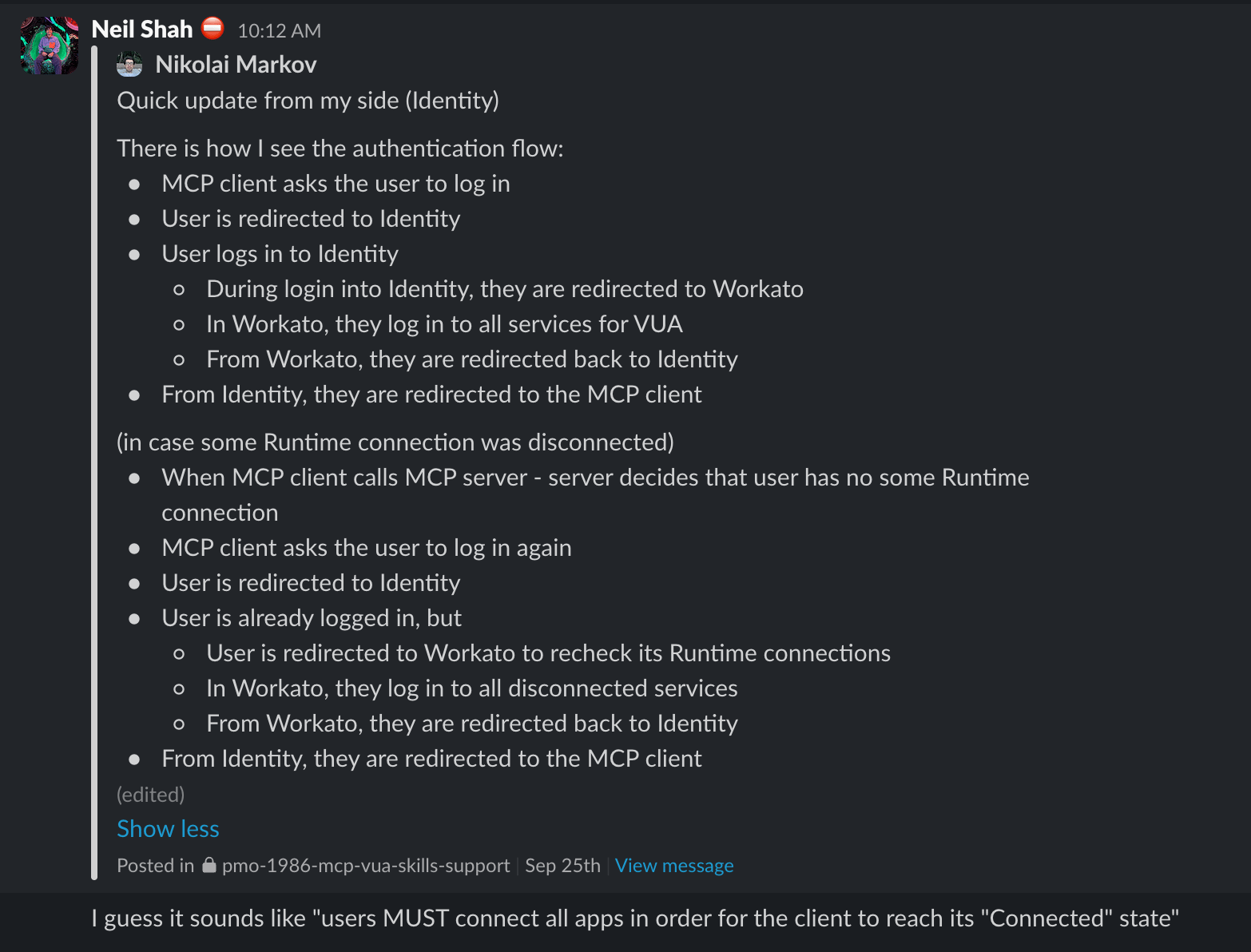
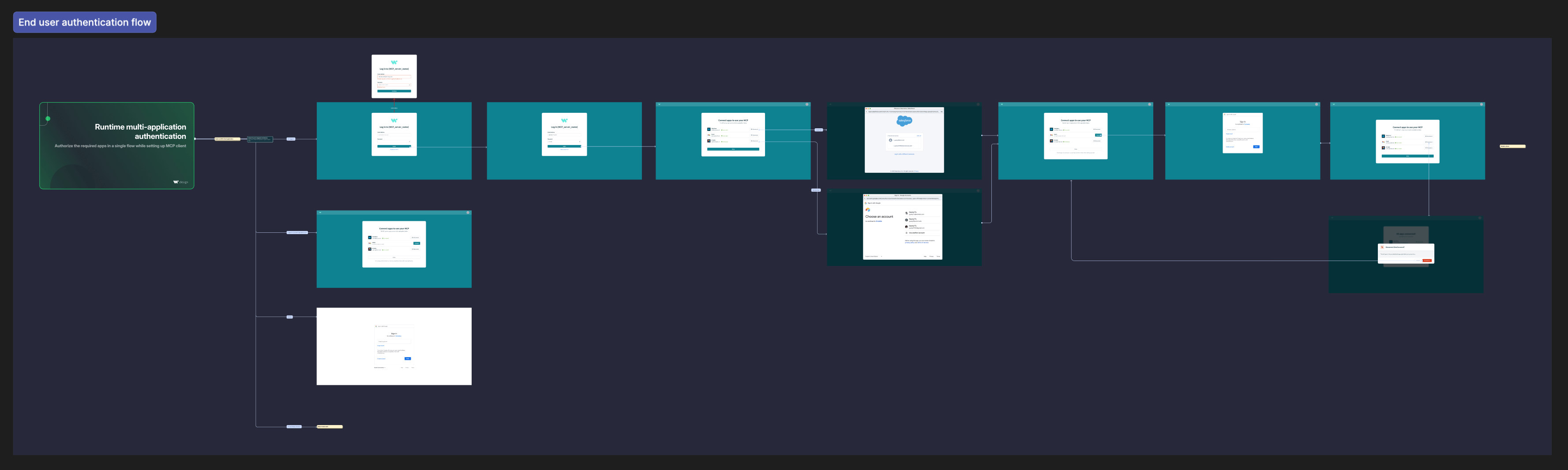
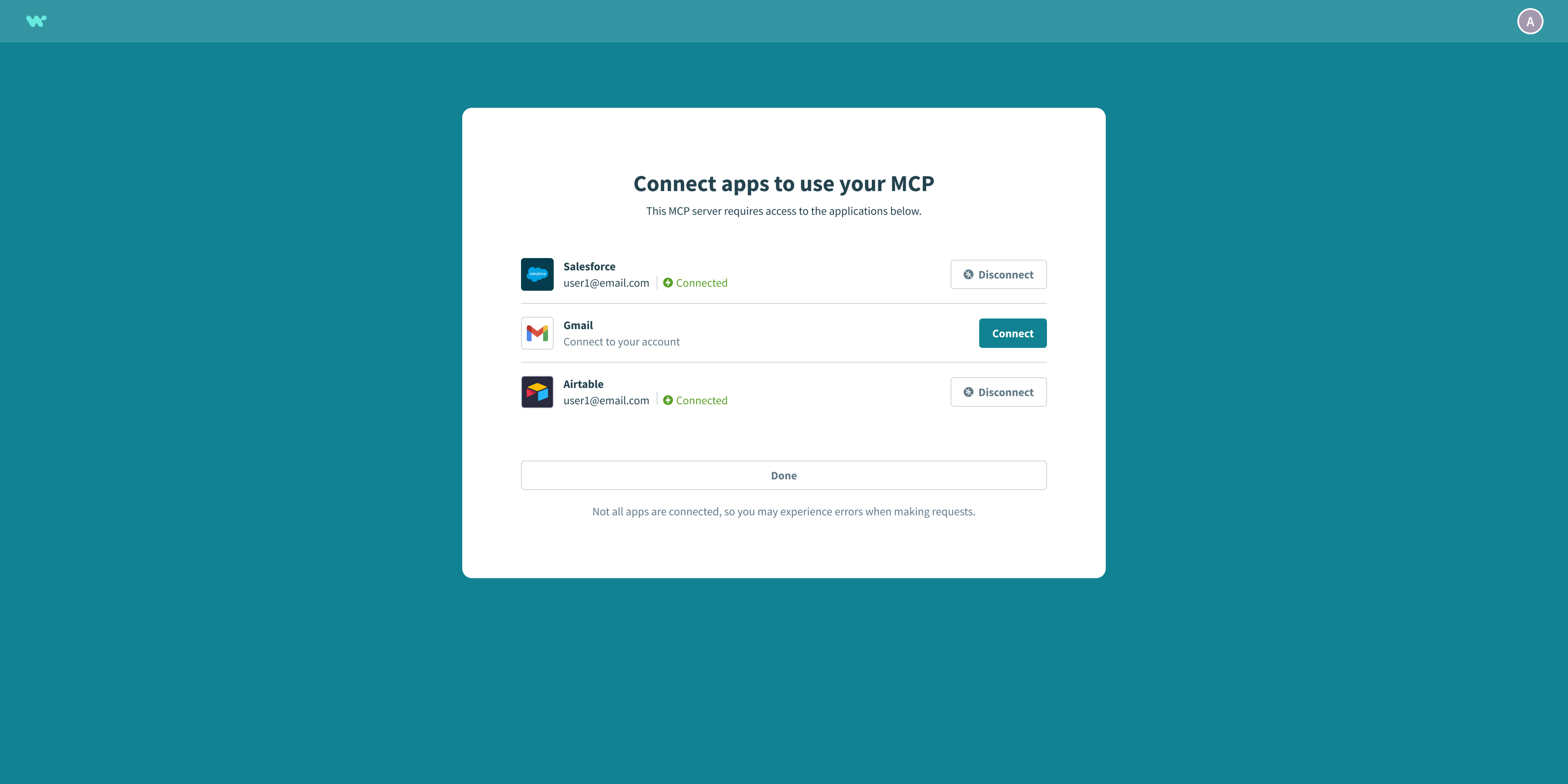
MILESTONE 3: The end user authentication workflow got introduced with “VUA” (verified user access) which requires that users sign in to any apps that the MCP requires connections to. I worked closely with product and engineering to understand how these workflows behave.
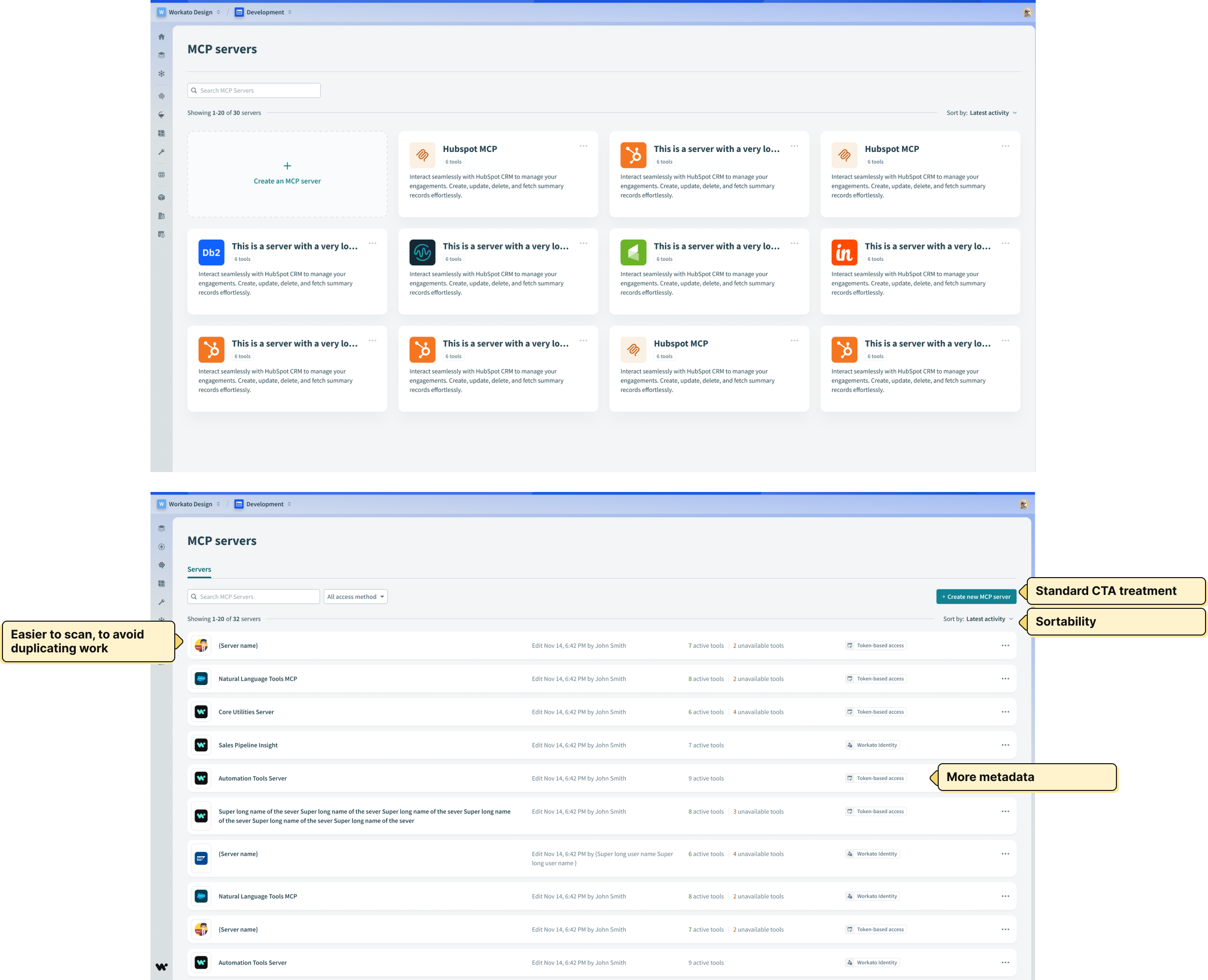
After milestone 3, we began addressing issues we were noticing in customer workspaces-- namely a lot of duplicate work. We originally explored a lot of options for the card designs, after being convinced it was the most familiar format for MCP catalogs. However after watching ongoing early usage, eventually settled on the list layout because it suits user-defined content better than a catalog layout does. The original grid layout had issues:
- Hard to scan
- Limited sortability
- Affects CTA treatment
- Results in duplicate work (users creating too many MCP servers)
Old to new layout
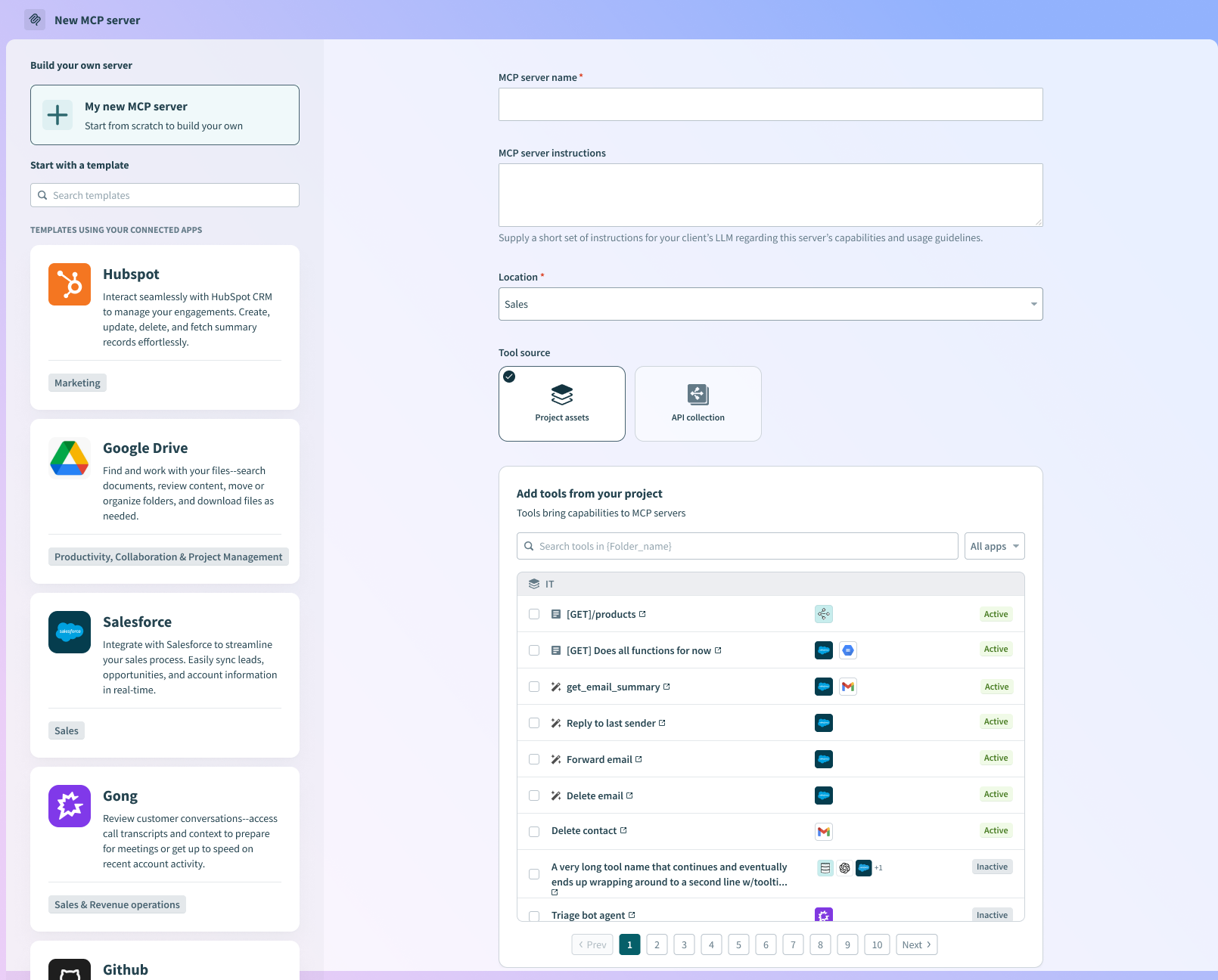
MILESTONE 4: The MCP creation wizard was replaced by a single-page workflow where users can select tools from existing assets in their Workato workspace. The templates panel on the left was added later to help users who may not have their resources ready to build a custom server, but want to get started and understand how it works.
The main problem we discovered for end users was avoiding duplicate work. When users are deciding to create a new MCP server, they were often unsure whether or not there was an existing server that could server their needs. This resulted in too many unnecessary MCP servers causing confusion within teams.
We originally released the card grid format, but soon realized it doesn’t scale with metadata amongst other limitations:
- Hard to scan
- Limited sortability
- Affects CTA treatment
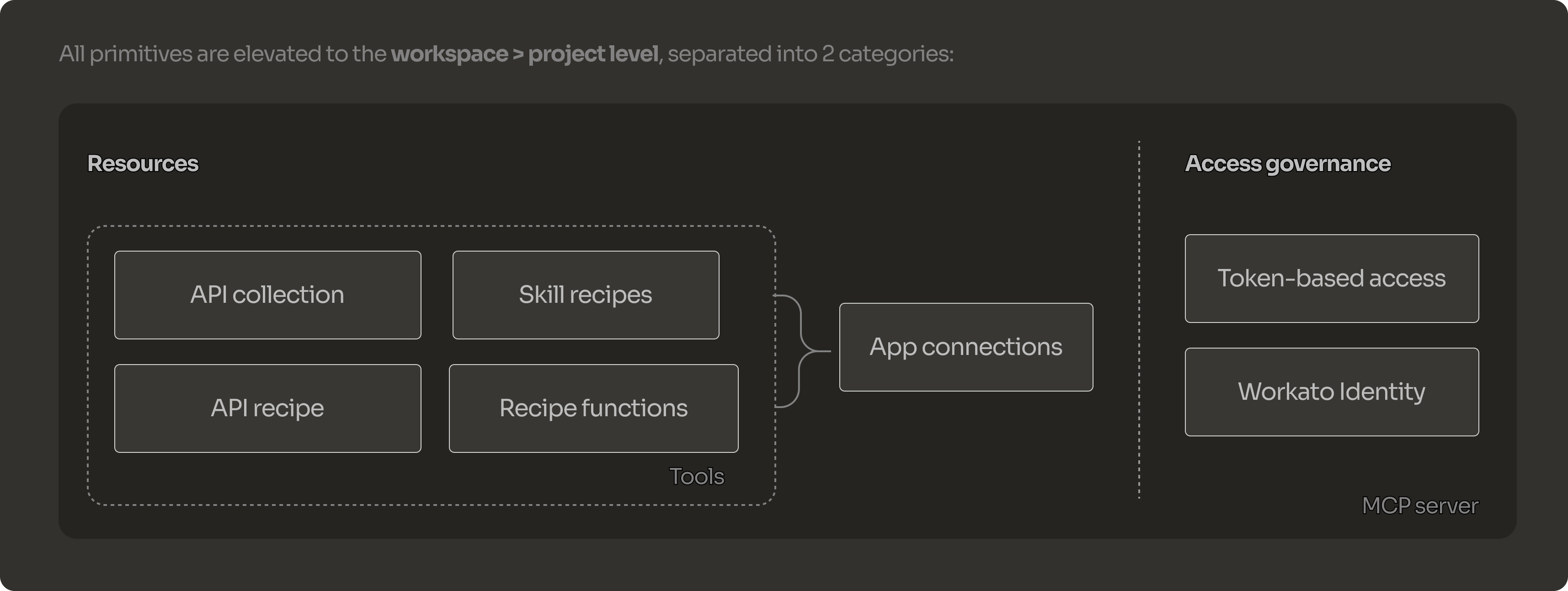
MILESTONE 4/5: Interaction design for the composable MCP server creation flow
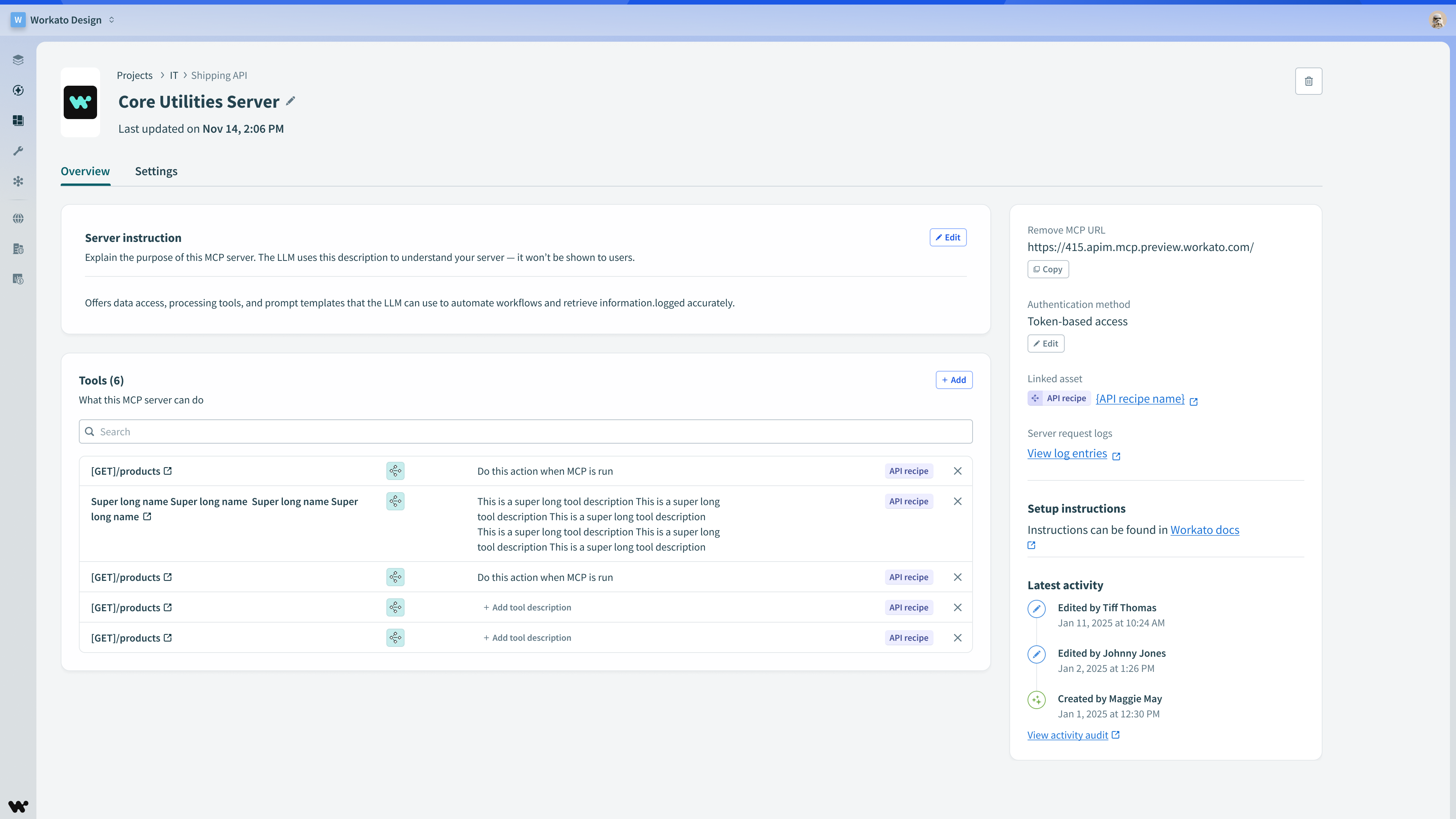
We updated the layout of the MCP detail page to accommodate a diversity of tool metadata, expanded instructions and descriptions, and affordances to add tools or edit descriptions.
We explored variations in table layouts when trying to figure out how best to display Skills. As later enhancement, I worked with the Digital Design team to produce more elegant random avatars rather than falling back on the MCP icon every time.
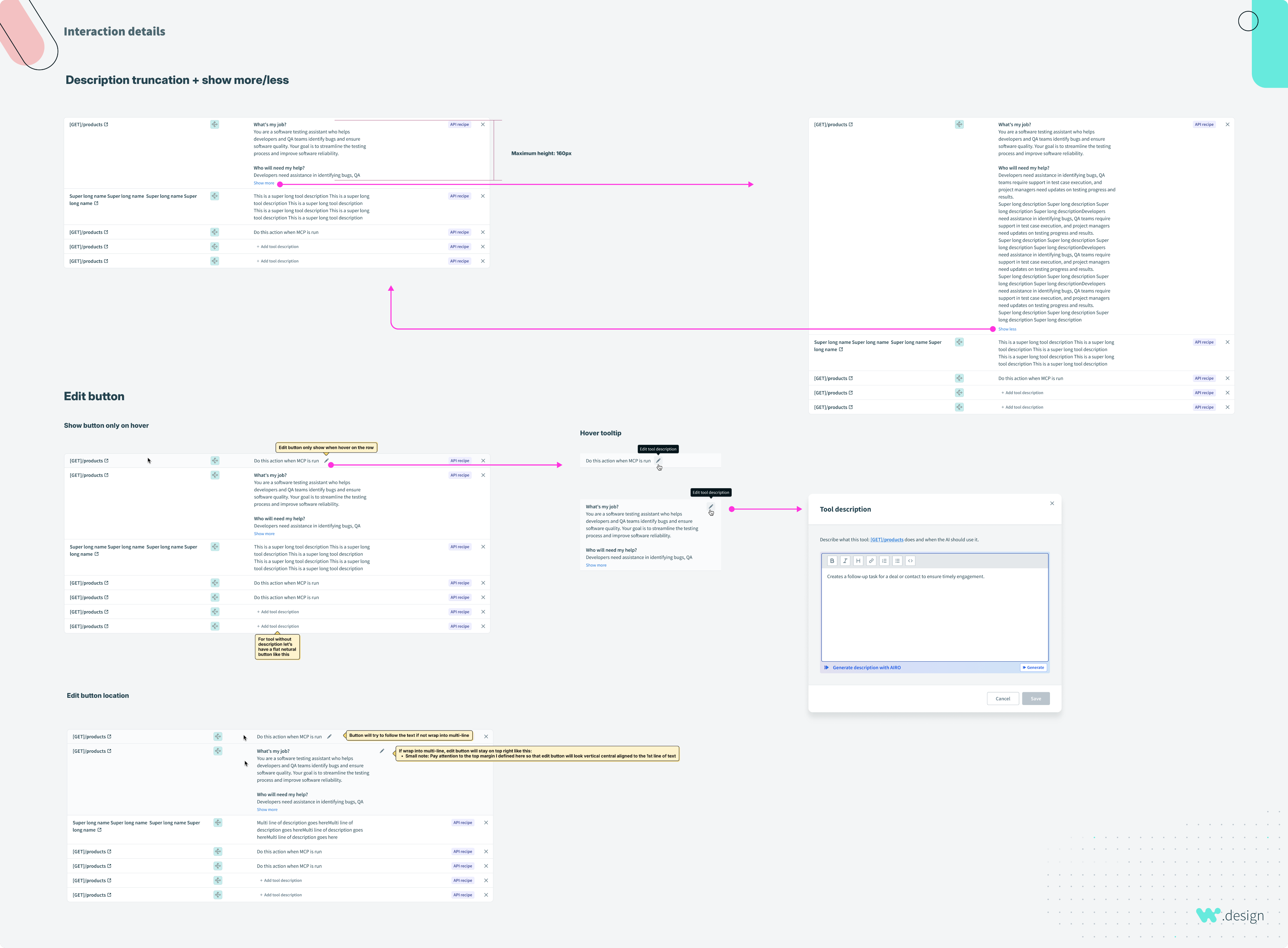
We learned that tool descriptions were really important for the LLM to accurately call the right tools, so we allowed for long descriptions in the list view and also invested in rich text editing capabilities to help builders structure tool descriptions for optimal performance.
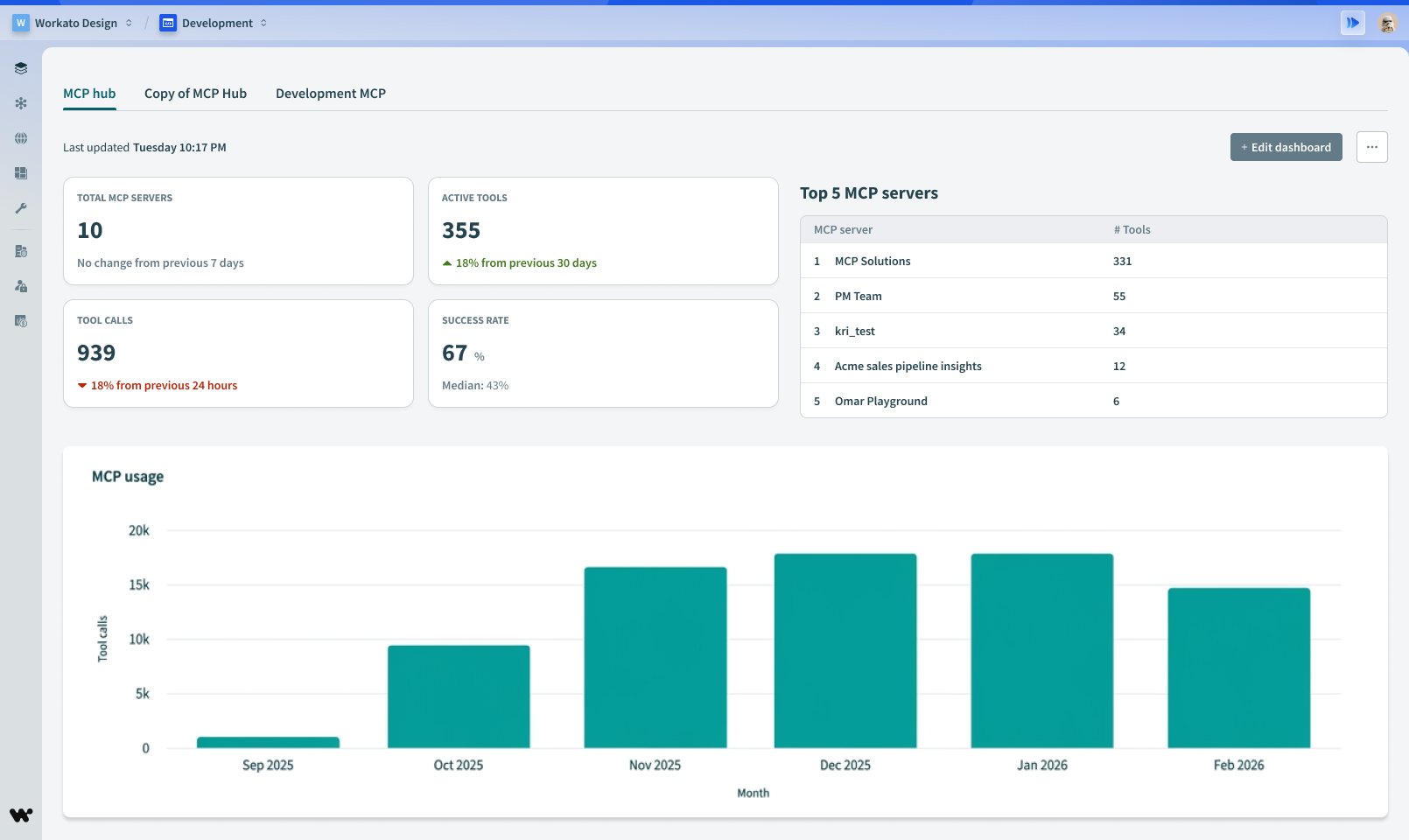
MILESTONE 6: An early release analytics dashboard containing MCP metrics
Measure
With our general audience launch, we were able to see the first week impact:
- 35 MCP servers created across 14 customers
- 1,031 active tools
- 6,392 tool calls
- 34% average tool failure rate (high)
Most customers were using Workato Identity as their auth method, and skill recipes were the most common type of tool. These metrics helped us validate things, and we kept a close eye on any usage insights and customer feedback collected.
A key learnings were received was through comments customers submitted in our feedback form:
“I do not know which tools are failing”
“How do I prompt my MCP server when I want to {XYZ}”
“How can I view examples of multi-app tool orchestrations?”
“I do not have Workato Identity, how do I avoid having to maintain tokens that expire?”
“I’m getting {ERROR_X} when prompting in {CLIENT_APP}, how do I figure out if this is is a problem with a tool or with the server?”A lot of the feedback was addressed by traceability and audit logs, in addition to better in-line user education. We moved to plug these holes quickly as they reflected expectations from enterprise teams.
Wrap up
A lot of the feedback was addressed by traceability and audit logs, in addition to better in-line user education. We moved to plug these holes quickly as they reflected expectations from enterprise teams.
/ Workato
Enterprise MCP Servers
Summary
Creating configuration workflows that enable powerful yet secure agentic interfaces for teams requires engineering involvement, limiting adoption and slow experimentation. The MCP server initiative aimed to close this gap by enabling non-technical knowledge workers to create no-code functional, trustworthy MCP servers directly within Workato and without technical support.
My role was to lead research and design for this initiative: Validating usability, defining the MCP server creation flow, and shaping a scalable foundation for “MCP-creation-as-a-service” personalization. This case study walks through how we uncovered pain points, validated opportunities and designed a human-centered flow that bridges technical capability with users.
Our team consisted of a Product Manager, 3-4 Engineers, Designer (me) and 4 pilot customers from our partnership program.
Claude’s client interface along with other compatible clients like Cursor enables users to access any API function by connecting to MCP servers
Problem definition
Hypothesis: There exists a large gap between knowledge workers, who truly understand the problems facing business teams, and technical workers (developers) who can implement the solution in a secure and compliant way. This is evident from the lack of enterprise-grade MCP creation and publishing products available today.
Scope: We have to break up our efforts into progress milestones that allows us to validate ideas, learn and fix things as we go, without introducing risks or unwanted customer outcomes.
Market opportunity: There are a range of MCP catalogs out there that allow users to install pre-defined MCP servers from common providers, but they all lack the capability of personalizing and customing the server to fit specific problems and business logic. Our “Composable MCP” that uses existing platform assets (e.g. “Skill Recipes”) and integrates with existing Identity Providers (e.g. OKTA) for the enterprise bridges that gap.
Starting scope small to build momentum
To generate traction, our PM and I broke down the north star into smaller verifiable milestones and connected the vision back to customer requirements. Prioritization played a key role in this approach. We divided the vision into several milestones, giving precedence to initiatives with manageable scope but high impact. We recognized that we couldn’t immediately solve all the problems at once -- but we could get things moving with the resources we had.
Core workflows
We identified 2 primary personas we need to serve for this project. Using precedent and existing patterns from companies like Anthropic and OpenAI, we know that “builders” need to create MCP servers and provision access, while “end users” need to install the MCP servers and prompt them in their client apps.
Building (with validation)
The Workato design system provided a solid foundation to begin exploring designs. Below are some solution artifacts from each milestone that was shipped. In some cases we allowed for requirements to be fluid across milestones to accommodate engineering planning.
MILESTONE 1: Initially, we built on top of the API platform product, merely adding a toggle allowing users to create MCP servers from API collections that were already built on the platform from API endpoint recipes.
After allowing builders to turn API collections into MCP servers, we added the URL that end users would need to install the MCP server in Claude or another client app.
Because this was only accessible to Workato platform users who have been provisioned to access the API Platform, not many people could discover it. It was clear we needed to make MCP servers more discoverable, and accessible.
After allowing builders to turn API collections into MCP servers, we added the URL that end users would need to install the MCP server in Claude or another client app.
Because this was only accessible to Workato platform users who have been provisioned to access the API Platform, not many people could discover it. It was clear we needed to make MCP servers more discoverable, and accessible.
MILESTONE 2: To improve discoverability and bring MCPs into the main navigation menu, we centralized all AI capabilities within a new top-level section called “AI Hub.”
Since MCP as a protocol is not native to Workato, we leaned on some existing MCP server UI patterns to inform our design direction.
The Landing page state for MCP servers within the AI Hub.
MCP creation wizard design using existing wizard components
We were getting feedback from customers that “AI Hub” was ambiguous and they were hesitant to click it.
MILESTONE 2: Final navigation menu design. We considered a range of options before landing on this.
Initial release for the MCPs server detail page
We decided to default each new MCP server to the “Workato Identity” auth method if that was already enabled in the workspace. It allows builders to define which user groups can access a parctiular MCP server. This has many advantages over relying on token sharing which is prone to overuse and requires more technical setup.
MILESTONE 3: Adding the “Settings” section where users can switch the authentication method for an MCP server.
MILESTONE 3: The end user authentication workflow got introduced with “VUA” (verified user access) which requires that users sign in to any apps that the MCP requires connections to. I worked closely with product and engineering to understand how these workflows behave.
After milestone 3, we began addressing issues we were noticing in customer workspaces-- namely a lot of duplicate work. We originally explored a lot of options for the card designs, after being convinced it was the most familiar format for MCP catalogs. However after watching ongoing early usage, eventually settled on the list layout because it suits user-defined content better than a catalog layout does. The original grid layout had issues:
- Hard to scan
- Limited sortability
- Affects CTA treatment
- Results in duplicate work (users creating too many MCP servers)
Old to new layout
MILESTONE 4: The MCP creation wizard was replaced by a single-page workflow where users can select tools from existing assets in their Workato workspace. The templates panel on the left was added later to help users who may not have their resources ready to build a custom server, but want to get started and understand how it works.
The main problem we discovered for end users was avoiding duplicate work. When users are deciding to create a new MCP server, they were often unsure whether or not there was an existing server that could server their needs. This resulted in too many unnecessary MCP servers causing confusion within teams.
We originally released the card grid format, but soon realized it doesn’t scale with metadata amongst other limitations:
- Hard to scan
- Limited sortability
- Affects CTA treatment
MILESTONE 4/5: Interaction design for the composable MCP server creation flow
We updated the layout of the MCP detail page to accommodate a diversity of tool metadata, expanded instructions and descriptions, and affordances to add tools or edit descriptions.
We explored variations in table layouts when trying to figure out how best to display Skills. As later enhancement, I worked with the Digital Design team to produce more elegant random avatars rather than falling back on the MCP icon every time.
We learned that tool descriptions were really important for the LLM to accurately call the right tools, so we allowed for long descriptions in the list view and also invested in rich text editing capabilities to help builders structure tool descriptions for optimal performance.
MILESTONE 6: An early release analytics dashboard containing MCP metrics
Measure
With our general audience launch, we were able to see the first week impact:
- 35 MCP servers created across 14 customers
- 1,031 active tools
- 6,392 tool calls
- 34% average tool failure rate (high)
Most customers were using Workato Identity as their auth method, and skill recipes were the most common type of tool. These metrics helped us validate things, and we kept a close eye on any usage insights and customer feedback collected.
A key learnings were received was through comments customers submitted in our feedback form:
“I do not know which tools are failing”
“How do I prompt my MCP server when I want to {XYZ}”
“How can I view examples of multi-app tool orchestrations?”
“I do not have Workato Identity, how do I avoid having to maintain tokens that expire?”
“I’m getting {ERROR_X} when prompting in {CLIENT_APP}, how do I figure out if this is is a problem with a tool or with the server?”
Wrap up
A lot of the feedback was addressed by traceability and audit logs, in addition to better in-line user education. We moved to plug these holes quickly as they reflected expectations from enterprise teams.
/ Workato
Enterprise MCP Servers
Summary
Creating configuration workflows that enable powerful yet secure agentic interfaces for teams requires engineering involvement, limiting adoption and slow experimentation. The MCP server initiative aimed to close this gap by enabling non-technical knowledge workers to create no-code functional, trustworthy servers directly within Workato and without technical support.
My role was to lead research and design for this initiative: Validating usability, defining the MCP server creation flow, and delivering a composable “MCP-creation-as-a-service” type of user experience. This case study walks through how we uncovered pain points, validated opportunities and designed a human-centered flow that bridges technical capability with users.
Our team consisted of a Product Manager, 3-4 Engineers, Designer (me) and 4 pilot customers from our partnership program.
Claude’s client interface along with other compatible clients like Cursor enables users to access any API function by connecting to MCP servers
Problem definition
Hypothesis: There exists a large gap between knowledge workers, who truly understand the problems facing business teams, and technical workers (developers) who can implement the solution in a secure and compliant way. This is evident from the lack of enterprise-grade MCP creation and publishing products available today.
Scope: We have to break up our efforts into progress milestones that allows us to validate ideas, learn and fix things as we go, without introducing risks or unwanted customer outcomes.
Market opportunity: There are a range of MCP catalogs out there that allow users to install pre-defined MCP servers from common providers, but they all lack the capability of personalizing and customing the server to fit specific problems and business logic. Our “Composable MCP” that uses existing platform assets (e.g. “Skill Recipes”) and integrates with existing Identity Providers (e.g. OKTA) for the enterprise bridges that gap.
Starting scope small to build momentum
To generate traction, our PM and I broke down the north star into smaller verifiable milestones and connected the vision back to customer requirements. Prioritization played a key role in this approach. We divided the vision into several milestones, giving precedence to initiatives with manageable scope but high impact. We recognized that we couldn’t immediately solve all the problems at once -- but we could get things moving with the resources we had.
Core workflows
We identified 2 primary personas we need to serve for this project. Using precedent and existing patterns from companies like Anthropic and OpenAI, we know that “builders” need to create MCP servers and provision access, while “end users” need to install the MCP servers and prompt them in their client apps.
Building (with validation)
The Workato design system provided a solid foundation to begin exploring designs. Below are some solution artifacts from each milestone that was shipped. In some cases we allowed for requirements to be fluid across milestones to accommodate engineering planning.
MILESTONE 1: Initially, we built on top of the API platform product, merely adding a toggle allowing users to create MCP servers from API collections that were already built on the platform from API endpoint recipes.
After allowing builders to turn API collections into MCP servers, we provided the URL that end users would need to install the MCP server in Claude or another client app.
Because this was only accessible to Workato platform users who have been provisioned to access the API Platform, not many people could discover it.
We realized the importance of planning to move MCP servers within the core platform functionality.
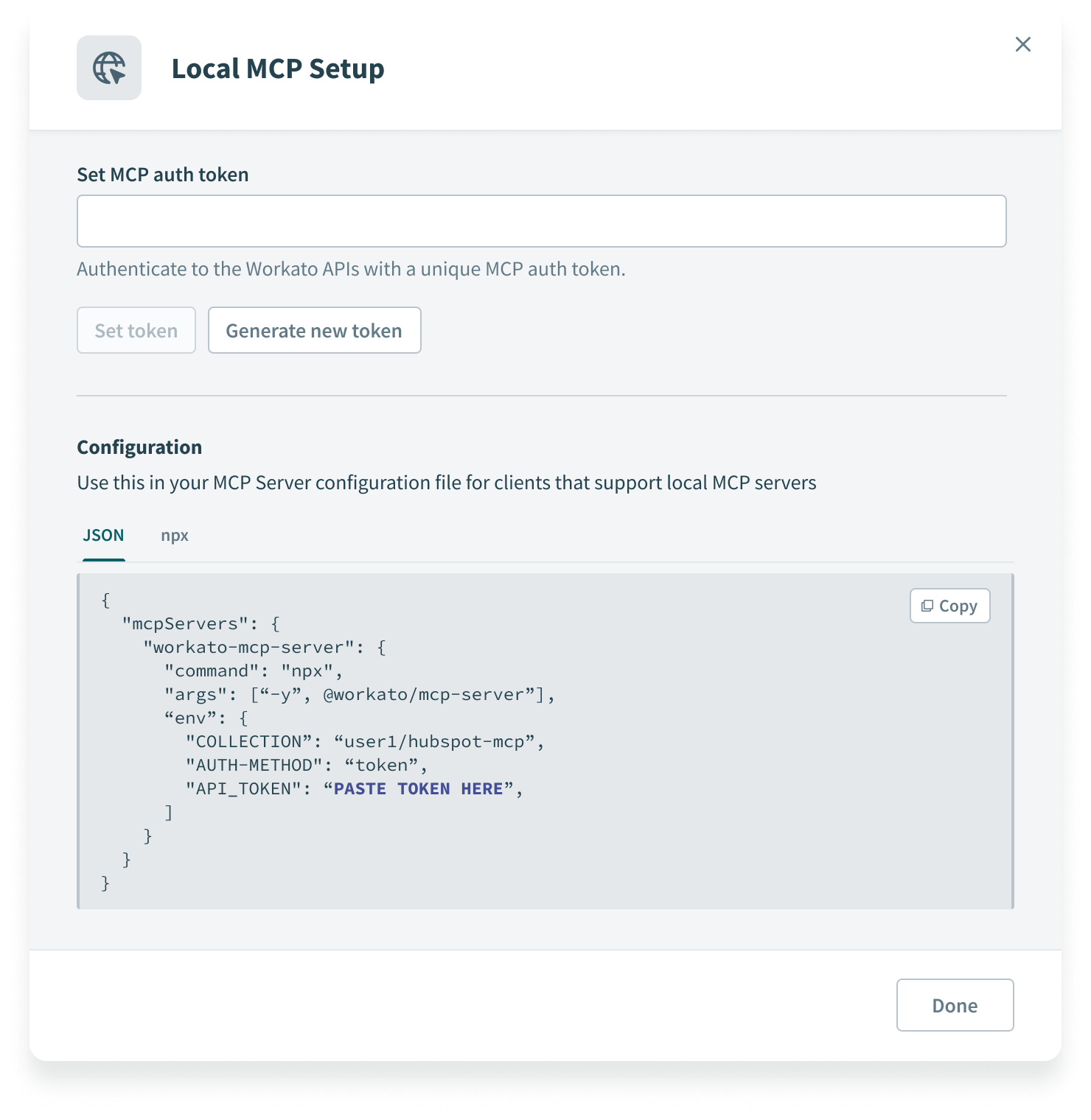
While figuring out how to educate users regarding installing their MCP servers, there was some ambiguity regarding how end users would prefer to run MCP client agent apps. Most of the popular MCP catalogs out there provided both local and remote URL installation types, allowing end users to decide where they’d like to run their client.
Following Anthropic’s lead, we determined that most people will be using remote MCP server URLs, so we decided there was no need to provide local MCP installation instructions.
MILESTONE 2: To improve discoverability and bring MCPs into the main navigation menu, we centralized all AI capabilities within a new top-level section called “AI Hub.”
Since MCP as a protocol is not native to Workato, we leaned on some existing MCP server UI patterns to inform our design direction.
The Landing page state for MCP servers within the AI Hub.
MCP creation wizard design using existing wizard components
We were getting feedback from customers that “AI Hub” was ambiguous and they were hesitant to click it.
MILESTONE 2: Final navigation menu design. We considered a range of options before landing on this.
Initial release for the MCPs server detail page
Builders and IT admins need to ensure the right people can access each MCP server. They also need to ensure that people with access receive the correct permissions to application systems that MCP servers connect them to. I worked with the PM to prioritize greater controls over these things.
We decided to default each new MCP server to the “Workato Identity” auth method if that was already enabled in the workspace. It allows builders to define which user groups can access a parctiular MCP server. This has many advantages over relying on token sharing which is prone to overuse and requires more technical setup.
MILESTONE 3: Adding the “Settings” section where users can switch the authentication method for an MCP server.
MILESTONE 3: The end user authentication workflow got introduced with “VUA” (verified user access) which requires that users sign in to any apps that the MCP requires connections to. I worked closely with product and engineering to understand how these workflows behave.
After milestone 3, we began addressing issues we were noticing in customer workspaces-- namely a lot of duplicate work (users creating too many MCP servers). We originally explored a lot of options for the card designs, after being convinced it was the most familiar format for MCP catalogs. We decided to switch to a list layout because it suits user-defined content better than a catalog layout does. The original grid layout was:
- Hard to scan
- Limited sortability
- Affects CTA treatment
Old to new layout
MILESTONE 4: The MCP creation wizard was replaced by a single-page workflow where users can select tools from existing assets in their Workato workspace. The templates panel on the left was added later to help users who may not have their resources ready to build a custom server, but want to get started and understand how it works.
Composability was the most significant milestone from a user value standpoint. By allowing builders to leverage existing Workato Platform assets to compose MCP server toolsets, teams can now implement custom business logic using AI agents so that they behave in a predictable way every time.
The design challenge was maintaining an inviting, friendly tone while remaining functionally clear and easy to learn.
MILESTONE 4/5: Interaction design for the composable MCP server creation flow
We updated the layout of the MCP detail page to accommodate a diversity of tool metadata, expanded instructions and descriptions, and affordances to add tools or edit descriptions.
We explored variations in table layouts when trying to figure out how best to display Skills. As later enhancement, I worked with the Digital Design team to produce more elegant random avatars rather than falling back on the MCP icon every time.
We learned that tool descriptions were really important for the LLM to accurately call the right tools, so we allowed for long descriptions in the list view and also invested in rich text editing capabilities to help builders structure tool descriptions for optimal performance.
After validating each flow, we launched our Observability dashboard as a “limited preview” to select customer accounts. While the limited preview was occurring, we were iterating on it and following up on live product feedback.
MILESTONE 6: An early release analytics dashboard containing MCP metrics
Measure
With our general audience launch, we were able to see the first week impact:
- 35 MCP servers created across 14 customers
- 1,031 active tools
- 6,392 tool calls
- 34% average tool failure rate (high)
Most customers were using Workato Identity as their auth method, and skill recipes were the most common type of tool. These metrics helped us validate things, and we kept a close eye on any usage insights and customer feedback collected.
A key learnings were received was through comments customers submitted in our feedback form:
“I do not know which tools are failing”
“How do I prompt my MCP server when I want to {XYZ}”
“How can I view examples of multi-app tool orchestrations?”
“I do not have Workato Identity, how do I avoid having to maintain tokens that expire?”
“I’m getting {ERROR_X} when prompting in {CLIENT_APP}, how do I figure out if this is is a problem with a tool or with the server?”A lot of the feedback was addressed by traceability and audit logs, in addition to better in-line user education. We moved to plug these holes quickly as they reflected expectations from enterprise teams.
Wrap up
With the successful implementation of the MCP server creation flows propelling Workato’s growth in this area in the fall of 2025, continuous learning and iteration promise exciting possibilities for the MCP server user experience and customer satisfaction.